Tuesday, August 7, 2018

Release 0.2.7: Quality and XML


This small release focuses on quality by integrating hosted automated code review services and introduces XML serialization.

Release 0.2.7: Quality and XML

Release content

A smaller release

As announced during the release of version 0.2.6, the month of June was busy developing a sample application to support the UICon'18 conference.

Unexpectedly, another interesting project emerged from this development but this will be detailed later on the blog.

In the end, the bandwidth was limited to work on this release.

XML Serialization

This version introduces the IXmlContentHandler interface as well as the gpf.xml.Writer class to enable XML writing.

If you are not familiar with the Simple API for XML, there are tons of existing implementation in different languages. The Java one is considered to be normative.

To put it in a nutshell, SAX proposes an interface to parse and generate XML.

The parsing part might be implemented later, only the generation one is required today.

Here is an example of an XML generation piped to a string buffer:

const writer = new gpf.xml.Writer(), output = new gpf.stream.WritableString(); gpf.stream.pipe(writer, output).then(() => { console.log(output.toString()); }); writer.startDocument() .then(() => writer.startElement("document")) .then(() => writer.startElement("a")) .then(() => writer.startElement("b")) .then(() => writer.endElement()) .then(() => writer.endElement()) .then(() => writer.startElement("c")) .then(() => writer.endElement()) .then(() => writer.endElement()) .then(() => writer.endDocument());

Which leads to the following output:

<document><a><b/></a><c/></document>

Representing the following structure:

document
|
+- a
|  |
|  +- b
|
+- c

Since all the methods returns a promise, the syntax is quite tedious. When writing the first tests, it quickly became clear that its complexity could be greatly reduced by augmenting the result promise with the interface methods.

As a result, a wrapper was designed to simplify the tests leading to this improved syntax:

const writer = new gpf.xml.Writer(), output = new gpf.stream.WritableString(); gpf.stream.pipe(writer, output).then(() => { console.log(output.toString()); }); wrap(writer).startDocument() .startElement("document") .startElement("a") .startElement("b") .endElement() .endElement() .startElement("c") .endElement() .endElement() .endDocument();

This will surely be standardized in a future version.

Improved gpf.require

Preloading

The goal of the library is to support application development. As explained in the article My own require implementation, splitting the code into modules enforces better code. However, at some point, all these modules must be consolidated to speed up the application loading.

This version offers the possibility to preload the sources by passing a dictionary mapping the resources path to their textual content. As a result, when the resource is required, it does not need to be loaded.

Here is the proposed bootstrap implementation:

gpf.http.get("preload.json") .then(function (response) { if (response.status === 200) { return JSON.parse(response.responseText); } return Promise.reject(); }) .then(function (preload) { gpf.require.configure({ preload: preload }); }) .catch(function (reason) { // Document and/or absorb errors }) .then(function () { gpf.require.define({ app: "app.js" // Might be preloaded }, function (require) { require.app.start(); }); });

Modern browsers

One of the challenges of building a feature-specific version of the library (a.k.a. flavor) is to test it with modern browsers only. The compatibility layer of the library takes a significant part of it and is useless if the flavor's target is NodeJS or any recent browser.

Worst, while building the release, the tests were failing when 'old' browsers were configured.

So, the concurrent task was modified to include a condition on modern browsers.

These are considered modern:

  • Chrome
  • Firefox
  • Safari (if on Mac)

Quality improvement

Abstract classes

Quality is also about providing tools to make sure that developers don't make mistake. Abstract classes concept is one of them. This version offers the possibility to create abstract classes by adding $abstract in their definition.

If one wants to deal with abstract methods, they can be defined with gpf.Error.abstractMethod. However, this won't prevent class instantiation.

Debugging with sources

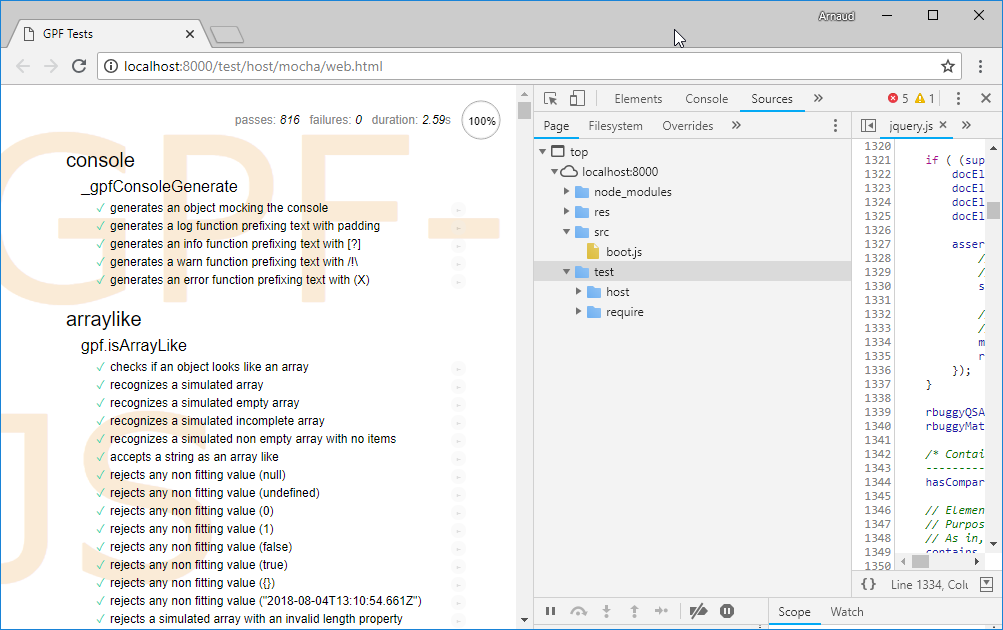
Debugging the library can be laborious. I am more familiar with Chrome development tools and I sometimes use them with NodeJS. Because the sources are loading through the evil-ish use of eval, they don't appear in the debugger sources tab.

No sources
No sources

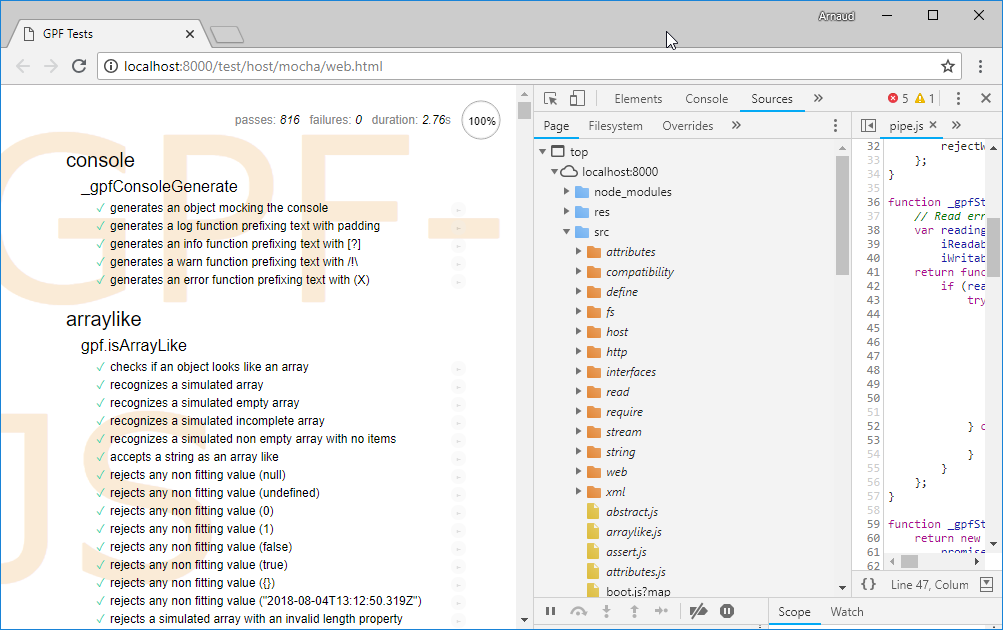
To solve that problem, source maps were applied.

To put it in a nutshell:

As a result, sources appear:

With sources
With sources

Hosted automated code review

GitHub is a huge source of information. While browsing some repositories, I discovered two code review services that integrates nicely.

They both focus on code quality (based on static checks) and propose exhaustive report on potential issues or code smells found in your code.

Today, only the src folder of the repository is submitted for review.

It revealed some interesting issues such as:

  • Code similarities, i.e. opportunity for code refactoring
  • Code complexities:

Some were already known and have been addressed in this version (in particular src/compatibility/promise.js where plato was giving a little 74.46).

The surprise came from a class definition with more than 20 methods as it was considered an issue (src/xml/writer.js). After having diligently improved the code, by isolating the XML validation helpers, one must admit that it makes things more readable !

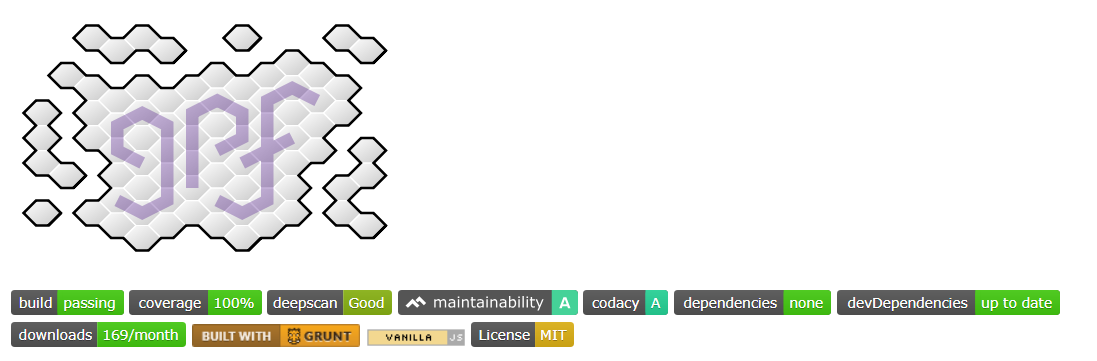
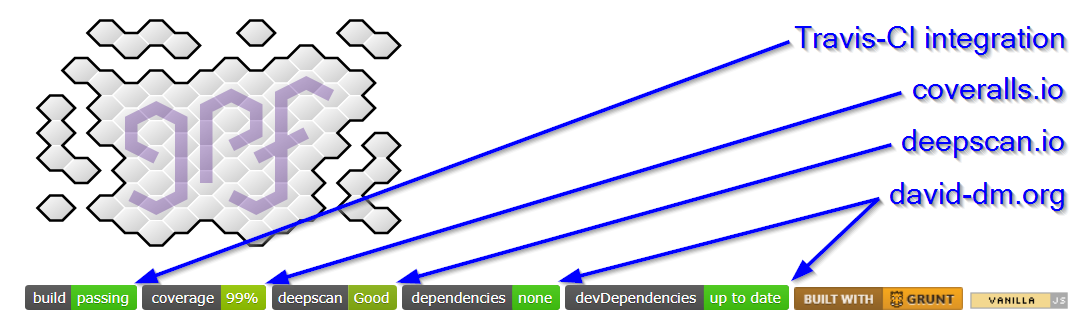
Finally, these tools rank the overall quality with a score that can be inserted in the project readme.

Quality scores
Quality scores

Lessons learned

From a pure development prospective, a lot was done in a very limited time. Since the quality of the code is enforced by the usual best practices (TDD, static code validation) but also measured (with plato), modifications are safe and immediately validated.

A lot was learned on JavaScript source mappings since it was required to enable debugging in the browser.

The relevance of the problems raised by the Code Climate tool was quit surprising: the overall project quality benefited from this integration.

Next release

The next release content is not even defined. For the next months, I will focus on a side project that requires all my attention.

Saturday, May 12, 2018

Release 0.2.6: gpf.require.js


This release fixes sporadic Travis issues, improves the modularization helper and finalizes the flavor mechanism to deliver the first reduced version of the library (gpf.require.js).

New version

Here comes the new version:

Release content

Sporadic Travis issues

From time to time, the Travis continuous integration build was failing with a message indicating that the coverage information was missing for the browser. Here is a recent example.

I was first suspecting the concurrent execution of quality checks to be the root cause of the issue. I disabled it but, still, the problem persisted.

So, I took a closer look on how the coverage information was generated while executing tests in the browser.

In the Travis environment, chrome is spawned as a command line with options to disable user interface. When the tests are completed, an AJAX request is triggered to save the tests results through the cache middleware. In the meantime a command line, responsible of spawning the browser, waits for the cache to be updated before closing the process.

Also, the test page is responsible of saving the coverage information through another AJAX request that goes to fs middleware.

I realized that the sequence was incorrect: the tests results were sent before the coverage information. The two steps are now executed in the correct order.

Improved gpf.require namespace

The modularization helper was improved following the feedback obtained after the first use:

gpf.require.js

Flavor specification

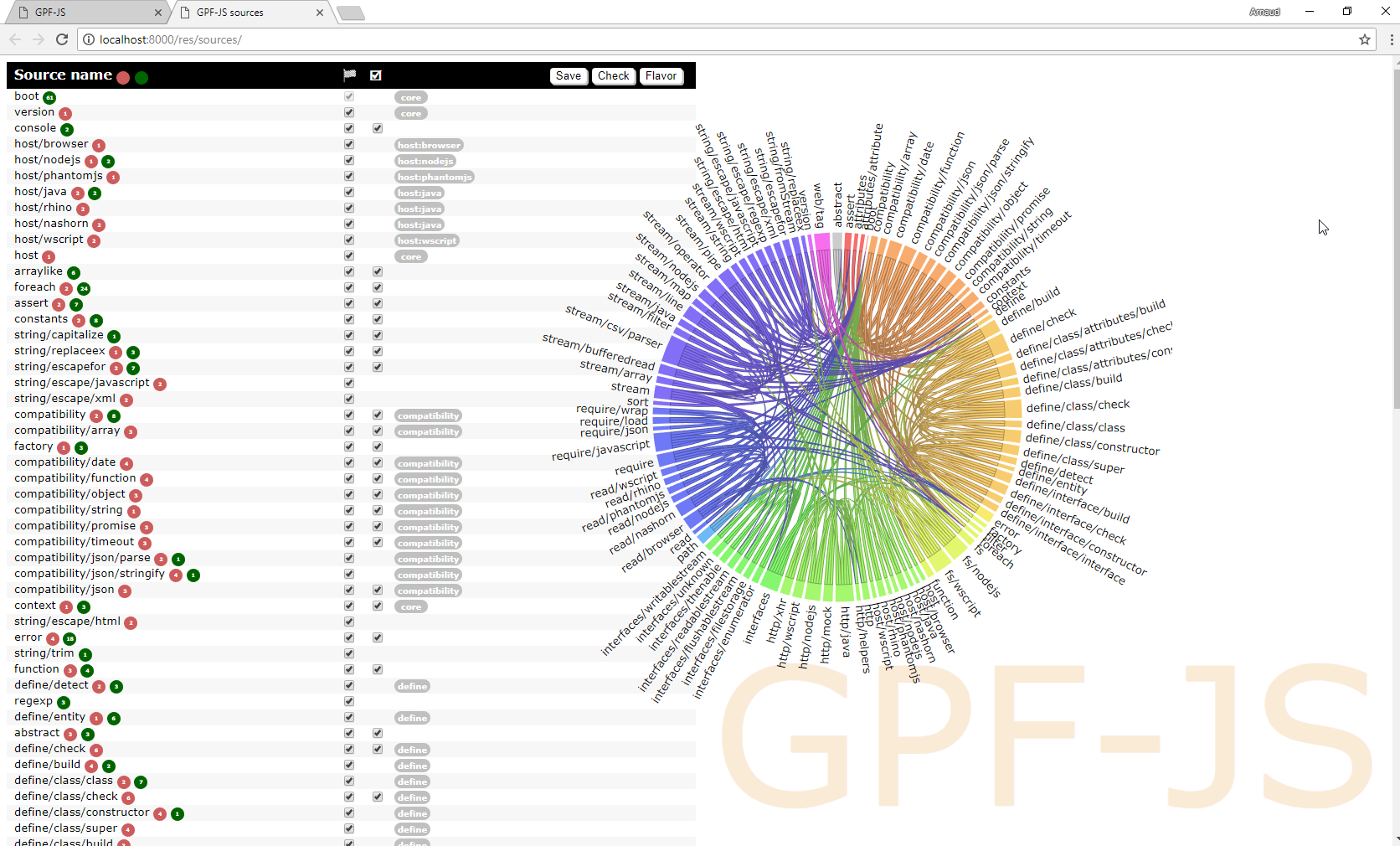
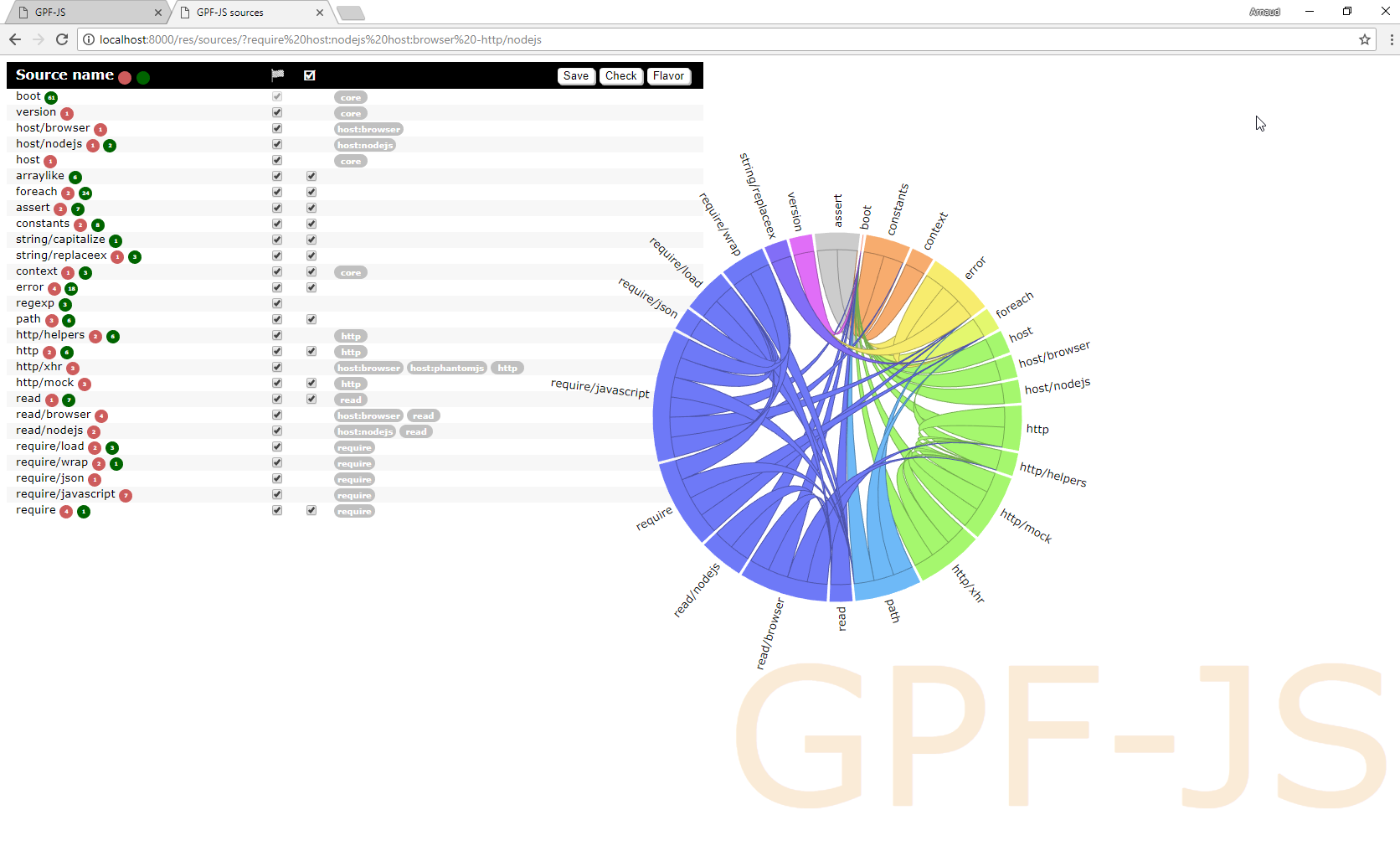
In the previous version, the dependency wheel was added to the source tile to give a visual representation of the dependencies. Also, each source file has been documented with 'tags' qualifying the feature or the host the source relates to.

Sources without any flavor selection

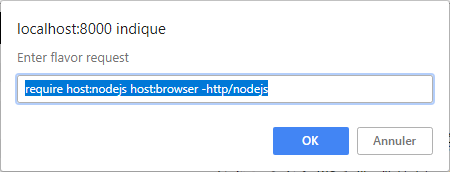
Also, in the previous version, a syntax was initiated to instruct, in a readable way, which sources should be kept for a given flavor. Combining the features list, hosts specification and dependencies, an algorithm - not my proudest one - is capable of generating an array of booleans filtering the list of sources.

Example of flavor syntax

As a result, the list of sources is reduced to meet the flavor specification.

Sources with a flavor selection

Everything was ready to setup the require flavor specification, it contains:

  • The version in which the flavor was introduced: it is required to build the versions table in the readme page
  • The flavor filter string
  • The tests required to validate the flavor
  • A functional description of the flavor: it will be used to document flavors (not yet implemented)
  • A technical description of the exposed API: the goal is to narrow down the list of namespaces / methods that are exposed by the flavor (not yet implemented)

Reducing flavor size

The very first results were quite disappointing:

  • The same way, Browser implementation of require depends on gpf.http to load the resource content. This namespace offers a mocking helper that is not needed for require. The code had to be drastically changed to successfully unplug this source.

Testing the flavor

There is no way the flavor could be officially released without making sure it works as expected. Luckily, the whole library is already 100% tested. Since the flavor description lists the test files to run, the development framework was altered to support a flavor parameter that:

Mostly, the following files were modified:

Obviously, the grunt make task that schedules all the tasks required to build the version was also modified.

Lessons learned

Creating this first flavor was quite an interesting challenge and it took longer than expected. It forced me to rethink the way the code is articulated, especially with regards to host specific implementations.

The original pattern consisted in dictionaries containing operations indexed by host name. However, this had a major drawback: every time it was accessed, it was uselessly impacting the performances and producing complex code.

Now, when appropriate, a new helper is introduced to define the proper implementation depending on the host.

Here is the gpf.http use case:

Regarding gpf.http.mock, I decided to plug it in the gpf.http implementation only when loaded, improving its modularity.

All this work paid, the maintainability ratio increased to 82.22.

One last thing, the require flavor supports only 'modern' browsers meaning the ones where the compatibility layer is not required. However, as of now, the development framework does not distinguish the configured browsers.

A configuration will be defined.

Next release

The next release content is not yet clearly defined. Since I will participate to UICon'18 as a presenter, I will first focus on delivering a good presentation.

I expect to work again on the library after June.

Wednesday, April 18, 2018

Friday, April 6, 2018

Release 0.2.5: Flavors

This release finalizes WScript simulation required for Travis, it improves the development environment and it introduces a mechanism to deliver smaller feature-centric versions of the library.

New version

Here comes the new version:

Release content

Finalized WScript simulation

In the previous release, Travis continuous integration platform was integrated. To assess that all hosts are working fine, WScript had to be simulated because not supported on Linux environments.

At that time, the result was not perfect and the coverage was reaching only 99% (including the documented exceptions).

To achieve 100%, the environment is now tweaked to disable standard objects and let the compatibility layer replace them with polyfills.

An unexpected test case

The simulation is based on the sync-request external library that implements synchronous HTTP requests in NodeJS. After enabling the JSON polyfills, the tests were failing... because of this library.

It revealed two problems:

  • The JSON emulation was incomplete
  • The compatibility tests were not covering all features of the JSON object

Universal Module Definition

After fixing the polyfills problems (see below), the final validation consisted in running the debug and release versions of the library inside the WScript simulator.

However, those versions are based on the concatenation of all sources with the Universal Module Loader.

This mechanism detects the current host and defines the gpf symbol accordingly.

When NodeJS is detected, which is the case here, the loader assigns the gpf namespace to module.exports to be the result of a require call.

But in WScript, the library is supposed to define the gpf symbol globally.

A workaround was implemented to simulate this behavior, it is done by leveraging the AMD syntax.

Improved JSON polyfill

The JSON.parse method accepts a reviver parameter that is used to transform parsed values before the final value is returned.

New tests were added and the missing part was implemented.

The same way, the JSON.stringify method accepts two additional parameters:

  • One, documented as replacer, that can be either a function to transform values before the stringification process or an array of string that serves as a whitelist of properties to be included in the final string.
  • A formatting parameter, documented as space, that is used to beautify the output of the method.

New tests were added and the missing parts were implemented.

Improved development environment

In this release, a significant effort was put in the development environment.

sources.json

The sources.json file is the spinal column of the library. It defines which sources are loaded and additional properties can be associated to them.

For instance, the "test" attribute defines when the associated test file (same name but under test instead of src) should be loaded. The default value being true, only the sources with no test file are flagged with false (for example).

The sources list was recently cleaned up for DeepScan. As a result, the remaining sources were all containing documentation to extract. Consequently, the "doc" attribute has been removed.

Also, a space separated list of tags was added, where:

  • core means the source is a core feature and it must always be loaded
  • host:hostname means the source is specific to the host hostname
  • any other tag is interpreted as a feature name (for instance: define, require, fs...)

This is used for the flavors development that will be detailed right after.

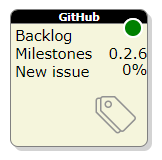
GitHub tile

A new tile was added to the development dashboard.

The GitHub tile
The GitHub tile

It connects to the GitHub API to fetch the current release progress and links directly to it.

This was also the opportunity to redesign the whole dashboard. All the HTML is now generated and modules are organized thanks to the gpf.require.define feature.

Documentation validation

The only way to make sure that all links contained in the documentation are actually pointing to something is to try them. A new step in the build process was added to validate the documentation by checking all the links.

Here again, it was a nice opportunity to test the gpf.http feature.

Dependency viewer

The sources page was redesigned to visually show dependencies. It was done thanks to the awesome dependency wheel from Francois Zaninotto.

Simplified release

Last but not least, the library is now completely released through a single command line.

Flavors

The library starts to generate interest but people often complain about the fact that it handles too many hosts and, consequently, it's too big.

Furthermore, some internal mechanics generate troubles:

  • The use of ActiveXObject may generate security issues on Internet Explorer
  • require("js") produces extra work with webpack
  • ...

Hence, some time was invested to study the ability to build smaller - more dedicated - versions by having a way to specify which parts to consolidate in the library.

The idea is to rely on feature tags.

For instance, if one wants to use require on NodeJS only, the flavor would be "require host:nodejs". From there, an algorithm is capable of listing all the sources that must be included by:

  • filtering sources from tags
  • adding selected sources' dependencies

Mapping stream

This release delivers a mapping stream that completes the filtering stream introduced in the last version.

Here is a modified version of the previous release's sample that includes mapping:

// Reading a CSV file and keep only some records /*global Record*/ var csvFile = gpf.fs.getFileStorage() .openTextStream("file.csv", gpf.fs.openFor.reading), lineAdapter = new gpf.stream.LineAdapter(), csvParser = new gpf.stream.csv.Parser(), filter = new gpf.stream.Filter(function (record) { return record.FIELD === "expected value"; }), map = new gpf.stream.Map(function (record) { return new Record(record); }) output = new gpf.stream.WritableArray(); // csvFile -> lineAdapter -> csvParser -> filter -> map -> output gpf.stream.pipe(csvFile, lineAdapter, csvParser, filter, map, output) .then(function () { return output.toArray(); }) .then(function (records) { // process records });

See how you can easily swap the streams to refactor the code: let say that the Record class has a method named isObsolete which gives the filtering condition. You don't need to rely on the CSV literal object properties to reproduce the logic:

// Reading a CSV file and keep only some records /*global Record*/ var csvFile = gpf.fs.getFileStorage() .openTextStream("file.csv", gpf.fs.openFor.reading), lineAdapter = new gpf.stream.LineAdapter(), csvParser = new gpf.stream.csv.Parser(), filter = new gpf.stream.Filter(function (record) { return !record.isObsolete(); }), map = new gpf.stream.Map(function (record) { return new Record(record); }) output = new gpf.stream.WritableArray(); // csvFile -> lineAdapter -> csvParser -> map -> filter -> output gpf.stream.pipe(csvFile, lineAdapter, csvParser, map, filter, output) .then(function () { return output.toArray(); }) .then(function (records) { // process records });

Lessons learned

This release enabled a 'real' productive use of the library. And, naturally, several weaknesses were identified.

For instance, requests to HTTPS websites were not working with NodeJS.

The same way, the usability of the gpf.require.define feature has to be improved whenever something goes wrong.

If loading fails because the resource file does not exist or its evaluation generates an error, the resulting exception must help the developer to quickly find and fix the problem:

  • Which resource is concerned?
  • Through which intermediate resources it was loaded?
  • What is the problem?
  • Where is the problem (line number)?

Also, debugging loaded module might become a challenge since the evaluation model prevents the browser to map the file in the debugger.

But, in the end, this exercise validated the concepts: the tiles were quickly redesigned and common code put in modules that are shared by all of them:

Next release

The next release content will mostly focus on:

  • Taking care of improving gpf.define.require
  • Releasing a standalone version of the gpf.define.require feature
  • Offering Object Oriented concepts (abstract classes, singletons, final classes)
  • Documenting JSON compatibility

Friday, March 2, 2018

Release 0.2.4: Attributes

This release increases quality, it provides a new streaming tool and it introduces attributes. Last but not least, a new scriping host was added to the supported list: Nashorn.

New version

Released right on time, here comes the new version:

Release content

Leftovers on gpf.require.define

When writing the article My own require implementation, the handling of JavaScript modules was split in two distinct parts:

  • CommonJS handling (mostly because of synchronous requires)
  • AMD / GPF handling (because asynchronous)

Furthermore, 'simple' CommonJS modules (i.e. no require with just exports) were not supported.

Those problems were addressed by fixing the issue #219.

Quality focus

A significant effort was put in quality:

This is all explained in the article Travis integration.

GPF-JS quality
GPF-JS quality

Nashorn support

Nashorn is another JavaScript engine implemented in Java. It's like Rhino's little brother: it's faster and delivered with Java Runtime Environment.

This new Java host made me realize that the gpf.rhino namespace was badly named. it has been deprecated it to the benefit of the gpf.java namespace.

Filtering stream

Previous release introduced gpf.stream.pipe to chain streams together.

This release delivers a filtering processor that forwards or blocks data based on a filtering function. Here is a modified version of the previous release's sample that includes filtering:

// Reading a CSV file and keep only some records var csvFile = gpf.fs.getFileStorage() .openTextStream("file.csv", gpf.fs.openFor.reading), lineAdapter = new gpf.stream.LineAdapter(), csvParser = new gpf.stream.csv.Parser(), filter = new gpf.stream.Filter(function (record) { return record.FIELD === "expected value"; }), output = new gpf.stream.WritableArray(); // csvFile -> lineAdapter -> csvParser -> filter -> output gpf.stream.pipe(csvFile, lineAdapter, csvParser, filter, output) .then(function () { return output.toArray(); }) .then(function (records) { // process records });

Attributes

Back to 2016, an article to introduce GPF-JS was written and it explains the concepts that were expected in the library: classes, interfaces and attributes.

The last pillar is introduced in this release.

It all starts by its simpler aspects:

More features will come soon but this rewriting is very exciting as it fixes all the issues of the initial draft (developed in 2015).

Improved development environment

It is now possible to use an authentication token to connect to the GitHub platform (previously user and password were required). It opens the door for a new tile in the dashboard to speed up development.

This is already enabled in the release process which has also been improved to prepare the following version in its final step. Unfortunately, the command line failed when testing it on this release and the remaining steps were finished manually

...which demonstrates how much value automation brings in this procedure...

Lessons learned

If it's not tested, it doesn't work. This was confirmed with Travis integration where the tools were run for the first time on a non-Windows environment.

The build process is taking longer, for two reasons:

  • There is a new host to test (Nashorn)
  • The library now has 9 legacy test files

A strategy will be decided to reduce the number of tests being run.

With the integration of Deepscan.io, a lot of cleaning has been applied because there is no easy way to exclude specific files from the tool (other than naming them one by one). All the unused files were moved from src & test to the new lost+found folder.

Next release

The library becoming more complex (and bigger), it might evolve to propose several 'flavors'. The goal would be to provide smaller / dedicated versions that cut in the feature set.

For instance, a modern browser version could see the file system management removed as well as the compatibility layer.

Today, the dependencies.json file enumerates module dependencies. To be able to isolate them, a more accurate view is required and some modifications must be done inside the sources.json file.

The next release content will mostly focus on:

  • Documenting attributes
  • Refining the WScript simulation
  • Improving the development framework (illustrate the versions)
  • Adding a new stream helper to transform records

Thursday, March 1, 2018

Travis integration


This article summarizes how Travis CI was plugged into the GPF-JS GitHub repository to assess quality on every push.

Quality control

Since the beginning of the GPF-JS project, quality is a high priority topic.

Over the years, a complete development and testing framework has been built:

  • Development follows TDD principles
  • The code is linted with eslint (also with jshint, even if it is redundant)
  • The maintainability ratio is computed using plato and verified through custom threshold values
  • Testing is done with all supported hosts
  • The coverage level is measured and controlled with custom threshold values
  • A web dashboard displays the metrics and gives access to the tools

However, these validations were done locally and they had to be run manually before pushing the code.

To enable collaboration and ensure that all pull requests would go to the same validation process, an continuous integration platform was required.

Another approach consists in creating git hooks to force the quality assessment before pushing. However, it requires the submitting platform to be properly configured. Having a central place where all the tests are being run guarantees the correct and unbiased execution of the tests.

Travis CI

Travis-CI is a free solution that integrates smoothly with GitHub. Actually, the GitHub credentials are used to login to the platform.

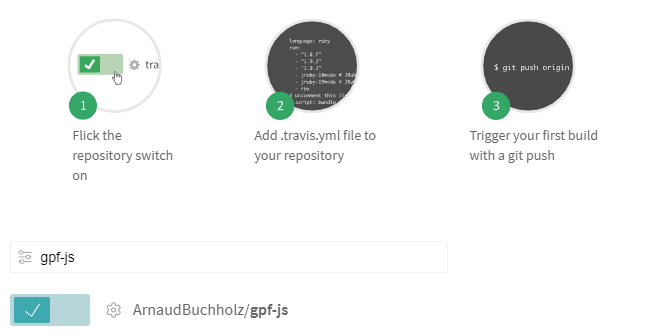
After authentication, all the repositories are made available to Travis and each one can be enabled individually.

Documented steps
Documented steps

The selected repositories must be configured to instruct Travis on how the builds are done. To put it in a nutshell, a new file (.travis.yml) must be added.

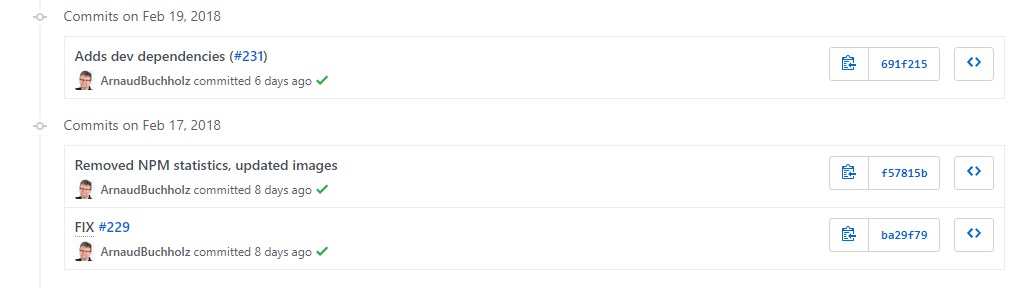
Once everything is put together, the platform will monitor pushes and trigger builds automatically. Eventually, it documents the push in GitHub with a flag indicating if the build succeeded.

Successful builds
Successful builds

When opening the Travis website, the user is welcomed with a nice dashboard listing the enabled repositories with their respective status.

Travis dashboard
Travis dashboard
.

The project README can be modified to show the last build result using an image delivered by the Travis infrastructure:

Changes in GPF-JS

.travis.yml

The .yml extension stands for YAML file: a structured format that is commonly used for configuration files. In the context of Travis, it describes the requirements and steps to build and validate the project.

Requirements

One obvious requirement of the GPF-JS development environment is NodeJS. This is configured by defining the language setting and selecting the Long Term Support version.

Chrome is also required to enable browser testing.

Grunt is installed using the proper command line.

The remaining requirements are described by the project dependencies and are installed through NPM.

Steps

The default step being executed by Travis is npm test

The resulting command line is specified in the package.json file; it executes grunt with the following tasks:

  • connectIf to setup a local web server necessary for browser and gpf.http testing
  • concurrent:source to execute all tests with the source version (see library testing tutorial)

But, first, the GPF-JS development environment requires a configuration file to be generated: it contains the list of detected hosts, the metrics thresholds and the HTTP port to be used to serve files.

Configuration

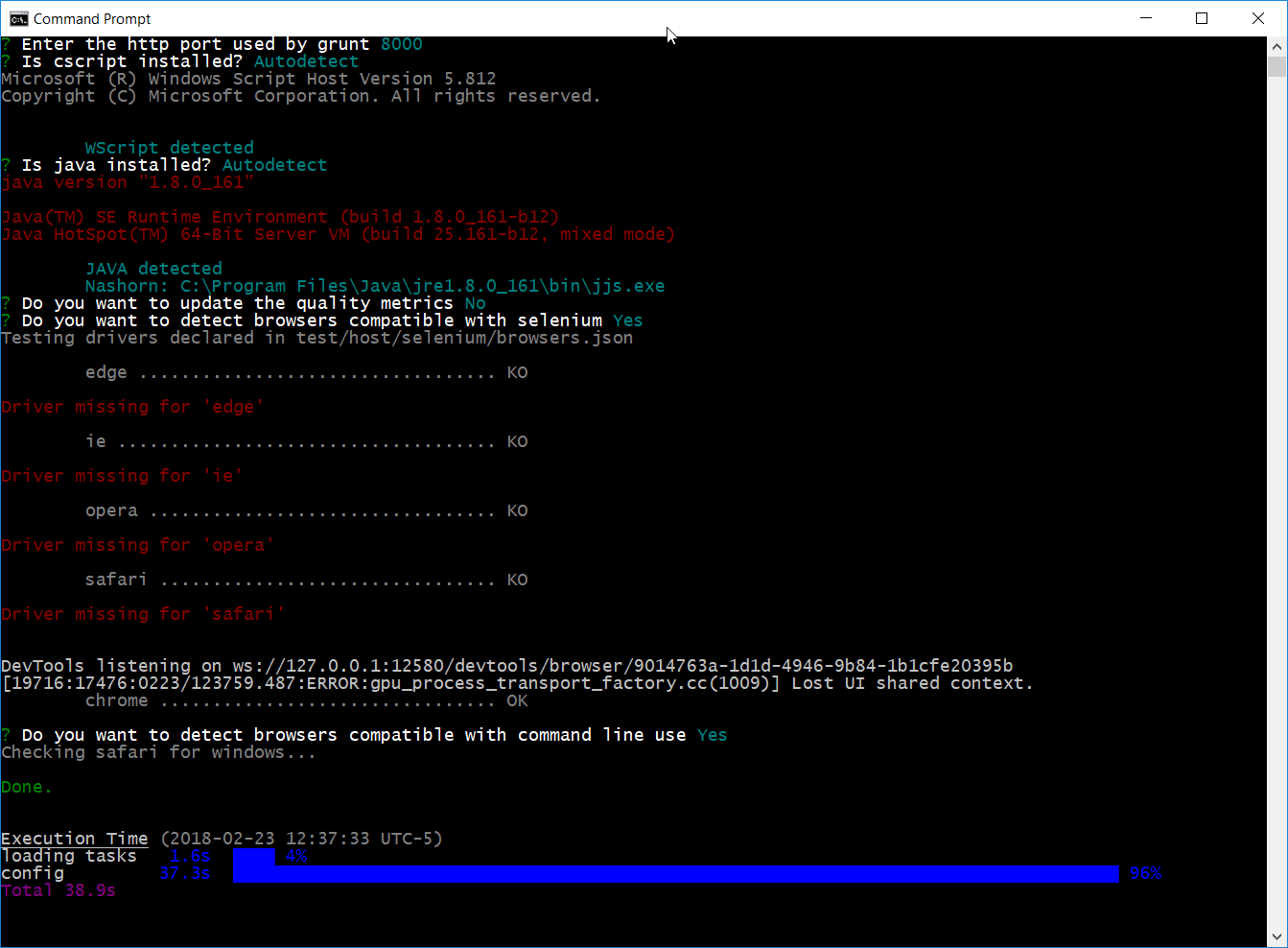
The configuration file is interactively created the very first time the grunt command is being executed. Indeed, the user input is expected to approve or change some values (such as the HTTP port).

Grunt config
Grunt config

However, on Travis, no user can answer the questions. Hence, the tool must be fully automatic.

When grunt is triggered, the gruntfile.js first checks if any configuration file already exist. If not, a default task takes place to run the configuration tool.

To support Travis, this default task processing was isolated in a folder of 'first-launch' configuration tasks. The name of the file is used to name the task.

The configuration tool was then modified to handle a so-called quiet mode and the Travis configuration task leverages this option. Additionally, the task also executes the quality tasks (linters, plato & coverage).

So, the command grunt travis is executed before the testing step to ensure the existence of the configuration file.

Challenges

After figuring out the different steps, a long debugging session - mostly composed of try and fail cycles - was required to figure out the specificities of the platform.

The history of pushes on the Travis integration issue illustrates all the attempts that were made.

Non-Windows environment

"If it's not tested, it doesn't work"

The very first issue was related to the environment itself. The development being made on Windows, the library has never been tested with a different operating system before.

Travis offers the possibility to use different flavors but the default one is Linux.

As a consequence, some scripts were adapted to handle the differences in the path separator (for instance).

NodeJS can absorb those differences. This is the reason why the library uses the / as a path separator but translates back to \ when running on Windows-specific host.

Browser testing

Another issue was related to browser testing. As a matter of fact, the Travis environment does not provide any graphical user interface by default. This being said, it means that you can't start a browser.

Fortunately, this is explained in the Travis documentation where several options are proposed.

And, luckily, the GPF-JS development environment provides an alternate way to test browsers.

Consequently, the headless mode of chrome is used.

Wscript

The operating system being Linux, the Microsoft Scripting Host is not available.

Unlike path separators, it is a normal situation as the configuration file includes a flag that is set upon detection of this scripting host.

However, one unexpected effect is bound to the code coverage measurement: a big part of the library is dedicated to bring older hosts to a common feature set and WScript was running most of it. Thus, the coverage minimum was not reached and the build was failing.

This was temporarily addressed by disabling the coverage threshold errors.

Also, thanks to the Wscript emulator project from Mischa Rodermond, a simple simulator implemented with node validates the WScript specifics.

There are still some uncovered part, but they will be fixed in a future release.

Other goodies

After digging through GitHub projects, I also discovered and integrated the coveralls package which can be used in conjunction with Travis so that coverage statistics are uploaded on a dedicated board.

I also added a dependency checker as well as a code quality checker (which required some cleaning).

Everything is visible from the project readme.

GPF-JS quality
GPF-JS quality

Friday, January 26, 2018

My own require implementation

The release 0.2.2 of GPF-JS delivers a polymorphic modularization mechanism that mimics RequireJS and CommonJS implementation of NodeJS. It was surprisingly easy to make it happen on all supported hosts now that the library offers the basic services. This API combines lots of technologies, here are the implementation details.

Introduction

The GPF-JS release 0.2.2 is finally out and it contains several improvements:

  • Better code quality
  • Better documentation
  • Some tests were rewritten

Actually, the GPF-JS is already in version 0.2.3 and it introduces stream piping. But this article took me a very long time to finalize!

But the exciting part of it is the new gpf.require namespace that exposes a modularization helper.

To give a bit of context, the article will start by explaining how modularity helps developers create better code. Then, a rapid overview of some existing modularization solutions will be covered. Finally, the implementation as well as the future of gpf.require will be explored.

Modularity

One file to rule them all

One File to bring them all and in the darkness bind them

In the Land of Mordor where the Shadows lie.

To demonstrate the value of modularity, we will start with an extreme edge case: an application which source code stands in one single file and a development team composed of several developers. We will assume that they all work simultaneously and a version control system is used to store the file.

Z Z Z Z Z

(Each developer works on a local copy of the source file and pushes to the file control system)

The first obvious concern is the resulting file size. Depending on the application complexity, and assuming no library is used, the source file will be big.

And with size comes additional problems, leading to maintainability issues. Even if guidelines are well established between the team members and comments are used, it will be hard to navigate through the lines of code.

JavaScript offer hoisting that basically allows the developer to use a function before it is being declared.

catName("Chloe"); function catName(name) { console.log("My cat's name is " + name); } // The result of the code above is: "My cat's name is Chloe"

But most linters will raise an error for the above code. Indeed, it is a best practice to declare functions and variables before using them.

So, the team will end up cluttering the source file to ensure declarations are made before use.

Not being able to navigate easily in the code also generates a subtler problem: some logic might be repeated because it was hard to locate.

Finally, having all developers work on a single file will generate conflicts when pushing it to the version control system. Fortunately, most of those systems have mechanism to solve the conflicts either automatically or with the help of the developer. But this takes developer time and it is not risk free.

Obviously, all these problems may appear on smaller files too but, in general, the larger the file the more problems.

Two questions are remaining:

  • What could be the advantages of having a single source file?
  • What is the maximum file size?

In the context of web applications, a single source file makes the application load faster as it reduces the number of requests. It does not mean that it must be written manually, there are many tools capable of building it.

For instance:

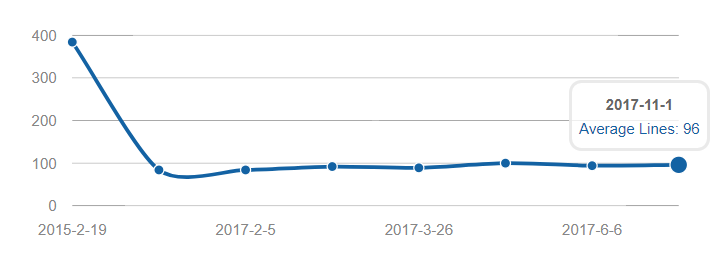
Answering the second question is way more difficult. From my experience, any JavaScript source file bigger than 1000 lines is a problem. There might be good reasons to have a such a big file but it always comes with a cost.

In GPF-JS, the average number of lines per source file is a little under 100. But it has not always been like this!

Plato report on GPF-JS

Divide and rule

Or divide and conquer

Code splitting is a good illustration of the divide and rule principle. Indeed, by slicing the application into smaller chunks, the developers have a better control over the changes.

A B C D A B C D

(Each developer works on separate - smaller - source files)

It sounds easy but it is not.

When it comes to deciding how to slice the application and organize the sources, there must be rules and discipline.

For example, maximizing the level of granularity by having one function per source will generate an overwhelming number of files. Also, not having a clear file structure will make the architecture obscure and will slow down the team.

Files organization

There are many guidelines and how-to on the web depending on the type of project or technology.

For instance:

On the other hands, some tools offer the possibility to instantiate new projects with a predefined structure. Such as Yeoman which contains thousands of project generators.

Yet, once the basic structure is in place, developers are still confronted with choices when new files must be created.

So, regarding files organization, here are some basic principles (in no particular order):

  • Folder names are used to qualify the files they contain. Indeed, if a folder is named "controller", it is more than expected to find only controllers in it. The same way, for a web application, a "public" folder usually indicates that its content is exposed
  • The folder qualification can be technical ("sources", "tests", "public") or functional ("controllers", "views", "dialogs", "stream") but mixing at the same level should be avoided. For one technology stack, if dialogs are implemented with controllers: it makes sense to see "dialogs" below "controllers" but having both in the same folder will be confusing
  • Try to stick to widely accepted (and understood) names: use "public" instead "www", use "dist" or "release" instead of "shipping"...
  • Try to avoid names that are too generic: "folder" (true story), "misc", "util", "helpers", "data"...
  • Stick to one language (don't mix French and English)
  • Select and stick to a naming formalism, such as Camel Case
  • Forget about the 8.3 or MAX_PATH limitations, names can be as long as necessary

... and 640K is enough for everyone :-)


Level of granularity

Once the structure is clearly defined, the only difficulty remaining is to figure out what to put inside the files. Obviously, their names must be self-explanatory about purpose and content.

Struggling to choose the right file name is usually a good sign that it contains more than necessary: splitting may

help.

In case of doubts, just associate:

Then, try to stick to the SOLID principles
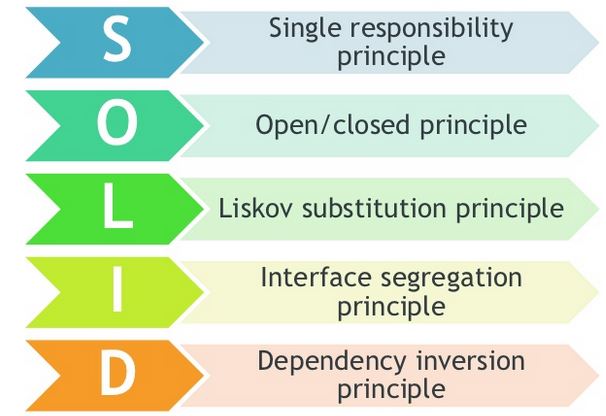
principles

In particular, the Single Responsibility principle should drive the choices when creating a new file.

Here is a shamelessly modified copy of the Wikipedia definition as it summarizes the idea: "The single responsibility principle is a computer programming principle that states that every module should have responsibility over a single part of the functionality provided by the software, and that responsibility should be entirely encapsulated by the module. All its services should be narrowly aligned with that responsibility."

Referring to the Liskov substitution principle and the Dependency inversion principle may look weird when considering source files but the following sections (in particular interface and mocking) will shed some light on the analysis behind this statement.

Basically, because of this definition, a source file is no more a senseless bunch of lines of codes but rather a self-contained feature. Hence, it will be referred as a module.

Modules

The advantages of modules are multiple:

  • Testability: it is sometimes difficult to draw the line between unit testing and integration testing. Long story short, if several modules are needed to run a test, it sounds like integration. On the other hand, if the module can be tested with no or very few dependencies (maybe through mocking), this is unit testing. So, ideally, a module can be easily isolated to achieve unit testing
  • Maintainability: on top of the testability, the file size should be relatively small. Both facts greatly increase the module's maintainability. This means that it is easier (in terms of complexity and effort) to improve or fix the module.
  • Reusability: no finger pointing here. Every developer starts his career by learning the 'virtues' of copy & paste. It takes time and experience to realize that code duplication is evil. Modules are an indisputable alternative to copy & paste because they are designed to be reusable.

Loading

The way modules are loaded varies for each host and some examples will be shown in the 'Existing implementations' section. This is where GPF-JS brings value by offering one uniform solution for all supported hosts.

The purpose of this part is not to explain each mechanism but rather describe the overall philosophy when it comes to loading the sources of an application.

Everything at once

Load all the files!

Load all the files!

As already mentioned before, there are tools designed to concatenate and minify all sources to generate a single application file. The resulting file is consequently self-sufficient and can be easily loaded.

Dependencies will be addressed later but, to generate this file, the tool must know the list of files to concatenate (or, usually, the folder where to find the files).

An alternative to load the application is to maintain a list of sources to load... in the correct order so that dependencies are loaded before their dependent modules.

As a result, in an HTML page, a big list of script tags is required to include all sources.

For example, let consider the following modules: A, B, C, D, E and F

  • A requires B and C to be loaded
  • B requires D to be loaded
  • E requires F to be loaded
  • F can be loaded separately

The resulting ordered lists can be:

  • D, B, C, A, F, E
  • C, D, F, B, A, E
  • F, D, C, B, A, E
  • F, E, D, B, C, A
  • ...

Advantages are:

  • Sequence being managed by a list, it gives a clear understanding of the loading process and allows the developers to fully control it
  • Unlike the unique concatenated file that is regenerated for each release, some files might not even change between versions. Consequently, the loading process can benefit from caching mechanism and the application starts faster.

Disadvantages are:

  • Every time a new source is created, it must be added to the list in the correct order to be loaded
  • The more files, the bigger the list (and the more complex to maintain)
  • When the list becomes too big, one may lose track of which files are really required. In the worst situation, some may be loaded even if they are not used anymore
  • Any change in dependencies implies a re-ordering of the list

This is not the preferred solution but this is how the source version of GPF-JS is handled. The lazy me has created some tools to maintain this list in the dashboard.

Lazy loading

Instead of loading all the files at once, another method consists in loading what is needed to boot the application and then load additional files when required. This is known as lazy loading.

Or the energy saving mode...


For each part of the loading process, the list of files to load must be maintained. Hence the benefits are mostly focused on the time needed to start the application.

Back to the previous example, E and F are big files requiring lot of time to load and evaluate.

  • Loading the application is done with the booting list: D, B, C, A
  • And, when required, the feature implemented by E is loaded with: F, E

Advantages are:

  • Faster startup of the application, it also implies smaller initial application footprint
  • Loading instructions are split into smaller lists which are consequently easier to maintain

Disadvantages are:

  • Once the application started, accessing a part that has not been previously loaded will generate delay
  • If any trouble occurs during the additional loading phase (such as no network) the application breaks

Dependency management

Whether the application is based on static or lazy loading, both mechanism require lists of files to load. However, maintaining these lists is time consuming and error prone.

Is there any way to get rid of these lists?


It's almost impossible to get rid of the lists but changing the scope simplifies their management. Instead of maintaining global lists of files to load, each module can declare which subsequent modules it depends on. This way, when loading modules, the loader must check dependencies and process them recursively.

Hence, the whole application can be started by loading one module which depends on everything else. Also, it means that, on top of implementing a feature, a module contains information about the way it should be loaded.

Back to the previous example:

  • A contains information that B and C must be loaded
  • B contains information that D must be loaded
  • E contains information that F must be loaded Then:
  • Loading the application is done by loading A
  • And, when required, the feature implemented by E is loaded with E

Advantages are:

  • No big lists to maintain, each module declare its dependencies separately
  • Better visibility on module dependencies
  • Simplified reusability of modules
  • New files are loaded if declared as dependencies
  • Only required files are loaded

Disadvantages are:

  • Loading a module is more complex: dependencies must be extracted and resolved recursively
  • Having such a fine level of granularity increases the risk of tangled dependencies and, in the worst case, deadlocks. For instance, three modules: A, B and C. If A depends on B, B depends on C and C depends on A, it is impossible to load any of them.
  • If one module is a common dependency to several other modules, it should be loaded only once. If not, the loading performances will be decreased because of multiple loading of the same module

Obviously, for the last part, the loading mechanism must handle some kind of caching.

Interface

Assuming modules have information about their dependencies, how do they access the features being exposed?

Global variables

Look Woody...

Look Woody...

There are many mechanism but the simplest one is to alter the global scope to export functions and variables.

Indeed, in a flat module, declaring functions and variables is enough to make them available globally in the application.

// No dependencies var ANY_CONSTANT = "value"; function myExportedFunction () { /* ...implementation... */ }

To be precise, this depends on the host and how the module is loaded. Let's stay simple for now.

The main advantage is simplicity.

However, problems occur as soon as the complexity of the module grows.

In fact, the module may also declare functions and variables that are used internally and those implementation details should not be exposed. With the above mechanism, it is almost impossible to guarantee that they won't be accessedor, worst, altered) and, consequently, it creates tight coupling with the rest of the application.

This means that it gives less flexibility when it comes to maintaining the module.

One easy workaround consists in encapsulating these implementation details inside a private scope using an Immediately Invoked Function Expression.

// No dependencies var ANY_CONSTANT = "value", myExportedFunction; // IIFE (function () { "use strict"; // Begin of private scope // Any functions or variables declared here are 'private' // Reveal function myExportedFunction = function () { /* ...implementation... */ } // End of private scope }());

Another aspect that should be considered when dealing with global symbols is name collisions. This can be quickly addressed with namespaces but here comes a challenging example.

Module interface

Do. Or do not. There is no try.


Let's consider an application capable of loading and saving documents. Developers were smart enough to isolate the serialization part inside a module which exposes two methods: save and load. The application grows in functionality and, for some reasons, saving and loading evolve to a new format. Still, for backward compatibility reasons, the application should be able to load older documents.

At that point, there are several possibilities:

  • Changing the code to support both formats in one function is not an option: for the sake of maintainability, there must be a wrapper function to detect the format and then switch to the proper implementation.
  • Rename the save and load methods to include a version number (for instance: saveV1, loadV1, saveV2 and loadV2). Then the code (production and test) must be modified to use the proper method depending on the format that needs to be serialized.
  • Create a namespace for each version and have the methods being set inside the proper namespace: app.io.v1.save, app.io.v1.load, app.io.v2.save and app.io.v2.load. Again, the code must be adapted but provided the namespace can be a parameter (thanks to JavaScript where namespaces are objects), this reduces the cost.
  • Define an interface and have one module per version that exposes this interface. It's almost like with namespacing but accessing the proper object does not depend on global naming but rather on loading the right module.

For instance: var currentVersion = 2, io = loadModule("app/io/v" + currentVersion); // io exposes save and load methods function save (fileName) { // Always save with the lastest version return io.save(fileName); } function load (fileName) { var version = detect(fileName); if (version !== currentVersion) { return loadModule("app/io/v" + version).load(fileName); } return io.load(fileName); }

The impact of the next version is limited to changing the name of the module. Remember lazy loading? This is an example where the oldest versions are loaded only when needed (reducing the application footprint on startup).

So, ideally, on top of providing dependency information, the module also exposes a known interface. It defines the expectations regarding the methods and variables that will be available and simplifies its integration and reusability.

Module loader

To summarize what has been presented so far:

  • An application is composed of modules, they are smaller parts encapsulating single functionalities
  • To simplify the loading of the application, modules declares their list of dependencies
  • Loading the module gives access to a given set of API a.k.a. interface

Consequently, the ultimate module loader is capable of extracting and resolving dependencies. Then it uses dependency injection to give access to the interfaces exposed by its dependencies.

Mocking

Test double

Test double

Another subtle benefit of modularity is related to unit testing.

Coming back to the example of module B requiring module D to be loaded: what if module D can't be loaded or used in a test environment? This module might require critical resources. For instance, it could access a database and alter its content: nobody wants the tests to mess with real data.

Does this mean that module B can't be tested because module D is not testable?

Well, if module D is exposing a well-defined interface and if the modularization system offers a way to substitute a module by another one, it is possible to create a fake module that exposes the same interface but mocking the functionalities.

Existing implementations

Browser includes

We are... browsers!

We are... browsers!

The simplest way to include a JavaScript source in an HTML page is to add a script tag.

Even though loading is asynchronous, and unless the attributes async or defer are specified, scripts are evaluated in the same order as they are declared in the page.

By default, the scope of evaluation is global. Consequently, any variable declaration is globally available as if it was a member of the window object.

As explained before, it is possible to create a private scope using an IIFE. Exposing the module interface can be done through assigning new members to the window object or using this in the IIFE.

Here is a small variation to make the exported API more explicit:

(function (exports) { "use strict"; // Begin of private scope // Any functions or variables declared here are 'private' // Reveal function exports.myExportedFunction = function () { /* ...implementation... */ } // End of private scope }(this));

In this context, declaring or loading dependencies inside a module becomes quite complex. Indeed, it is possible to generate script tags using JavaScript (or use AJAX requests) but the code must wait for the subsequent script to be loaded.

RequireJS

The RequireJS library was originally created for browsers but also works with other hosts (Rhino).

By offering a unique mechanism to load and inject modules, this helper solves all the problems of modularization. The factory function generates a private scope and receives the injected dependencies as parameters.

define(["dependency"], function (dependency) { "use strict"; // Begin of private scope // Any functions or variables declared here are 'private' // Reveal function return { myExportedFunction: function () { /* ...implementation... */ } }; // End of private scope });

The article "Understanding RequireJS for Effective JavaScript Module Loading" covers all the steps to start with the library.

NodeJs

Front end and back end...


NodeJS offers a modularization helper initially inspired from CommonJS.

Loading a module is as easy as calling the require function: loading is synchronous. The same way, the module can load its dependencies using require.

Modules have a private scope. If the global scope must be altered (which is not recommended), the global symbol is available.

But the normal way to expose the module API is to assign members to the module.exports object (the shortcut exports can also be used).

A typical module would look like:

"use strict"; // Begin of private scope // Any functions or variables declared here are 'private' var dependency = require("dependency"); // Reveal function module.exports = { myExportedFunction = function () { /* ...implementation... */ } }; // End of private scope

Actually, there are two types of modules.

NPM modules

The NPM repository stores a huge collection of modules which can be downloaded and updated using the NPM command line (installed with NodeJS). These modules are usually defined as project dependencies through the package.json file or they can be globally installed.

When loading these modules, they are referenced by an absolute name.

For instance, the GPF-JS NPM module, once installed, can be loaded with: var gpf = require("gpf-js");

You can experiment it yourself.

Local modules

On the other hand, the project may contain its own set of modules: they don't need to be published to be located. To load a local module, the path to the source file must be provided, it is relative to the current module.

var CONST = require("./const.js");

PhantomJS

PhantomJS proposes a similar approach to NodeJS when it comes to loading modules: a require function. However, it is a custom and limited implementation. See the following question thread for details.

Furthermore, this host is a hybrid between a command line and a browser. Hence, for most of the needs, it might be simpler to consider the browser approach.

Bundlers

A JavaScript bundler is a tool designed to concatenate an application composed of modules (and resources) into a single self-sufficient and easy-to-load file.

The good parts are:

  • it enforces code reuse by enabling modularization when developing
  • it speeds up the application loading by limiting the number of files
  • by relying on the dependence tree, it also trims files which are never loaded

The bad parts are:

  • The generated code is usually obfuscated, debugging might be complicated

Some bundlers are capable of generating the source map information. This helps a lot when debugging but the source code must be exposed.

  • The application file must be generated before running the application. Depending on the number of files it might take some time

The lack of humility before vanilla JavaScript that's being displayed here, uh... staggers me.


Browserify

Browserify is a bundler understanding the NodeJS require syntax and capable of collecting all JavaScript dependencies to generate one single file loadable in a browser (hence the name).

WebPack

WebPack is like browserify on steroids as it does more than just collecting and packing JavaScript dependencies. It is also capable of embedding resource files such as images, sounds...

The bubu-timer project is based on WebPack.

Transpilers

Most transpilers are also bundlers:

  • Babel which understands ES6
  • CoffeeScript, a sort of intermediate language compiled into JavaScript
  • Typescript, which can be extremely summarized by a JavaScript superset with type checking

If one plan to use one or the other, the following articles might help:

Windows Scripting File

Microsoft's cscript and wscript command lines offer a simple and a bit obsolete but yet interesting scripting host enabling the use of ActiveX objects.

I plan to document some valuable examples coming from past experiences demonstrating how one can send an outlook meeting request or extract host information using Windows Management Instrumentation

It can run any JavaScript file (extension .js) provided the system is properly configured or by setting the engine with the engine selector option /E. In GPF-JS, wscript testing is configured that way.

Manual loading

This host does not provide any standardized modularization helper for JavaScript files. One common workaround consists in loading and evaluating a file with the help of the FileSystem object and eval (which is evil):

var fso = new ActiveXObject("Scripting.FileSystemObject"), srcFile = OpenTextFile("dependency.js",1), srcContent = srcFile.ReadAll(); srcFile.Close(); eval(srcContent);

Which can be put in a function or summarized in one ugly line: eval((new ActiveXObject("Scripting.FileSystemObject")).OpenTextFile("dependency.js",1).ReadAll());

With this pattern, loading is synchronous and scope is global (because of eval).

Windows Scripting File

Microsoft designed the Windows Scripting File format that allows:

  • Language mixing, for instance VBA with JavaScript (but we are only interested by JavaScript, aren't we?)
  • References to component or external files

This is illustrated in Loading GPF Library tutorial.

Rhino

Almost like Microsoft's scripting hosts, Rhino (Java's JavaScript host) does not provide any modularization helper. However, the shell offers the load method which loads and evaluates JavaScript files. In that context too, loading is synchronous and scope is global.

Javascript's native import

Here comes a new keyword


There is no way this article could talk about JavaScript modularization without mentioning the latest EcmaScript's import feature.

Static import

When the name of the imported module is static (i.e. a string), the mechanism is called static import. It is synchronous and the developer decides what is imported. It also means that the module exposes an interface from a private scope.

For instance: import { myExportedFunction } from "dependency";

When the file dependency.js contains: "use strict"; // Begin of private scope // Any functions or variables declared here are 'private' // Reveal function export function myExportedFunction () { /* ...implementation... */ } // End of private scope

On one hand, static import is fully supported by NodeJS, transpilers and bundlers. Regarding browsers, native implementation are on their way.

On the other hand, Rhino and WScript do not support it. PhantomJS may support it in version 2.5.

Dynamic import

When the name of the imported module is built from variables or function calls, the mechanism is called dynamic import. As the name of the module to import is known at execution time, this generates some interesting challenges for the hosts and tools.

There are several proposals for implementation:

And it has recently become a reality in Chrome and Safari.

GPF-JS Implementation

My own implementation


API

The new namespace gpf.require exposes a modularization helper which entry point is gpf.require.define.

The main characteristics are:

  • It is working the same way on all hosts
  • Loading is asynchronous
  • Module scope is private (because of the pattern leveraging factory functions)
  • API exposure is done by returning an object

But the API also offers:

  • caching of loaded modules
  • cache manipulation to simplify testing by injecting mocked dependencies
  • synchronization through a Promise resolved when all dependencies are loaded and the module is evaluated (or rejected if any issue occurred)
  • lazy loading as it may be called anytime
  • resource types, dependent files may be JSON files or JavaScript modules

When writing a JavaScript module, several syntaxes are supported:

  • The 'GPF' way:

gpf.require.define({ name1: "dependency1.js", name2: "dependency2.json", // ... nameN: "dependencyN.js" }, function (require) { "use strict"; // Private scope require.name1.api1(); // Implementation // Interface return { api1: function (/*...*/) { /*...*/ }, // ... apiN: function (/*...*/) { /*...*/ } }; });

  • Using AMD format:

define([ "dependency1.js", "dependency2.json", /*...*/, "dependencyN.js" ], function (name1, name2, /*...*/ nameN) { "use strict"; // Private scope name1.api1(); // Implementation // Interface return { api1: function (/*...*/) { /*...*/ }, // ... apiN: function (/*...*/) { /*...*/ } }; });

"use strict"; // Private scope var name1 = require("dependency1.js"), name2 = require("dependency2.json"), // ... nameN = require("dependencyN.js"); name1.api1(); // Implementation // Interface module.exports = { api1: function (/*...*/) { /*...*/ }, // ... apiN: function (/*...*/) { /*...*/ } };

For this last format, the module names must be static and modules are always evaluated (reasons below).

Support of these formats was implemented for two reasons: it was an interesting challenge to handle all of them but it also offers interoperability between hosts. Indeed, some NodeJS modules are simple enough to be reused in Rhino, WScript or browsers without additional cost.

Implementation details

The implementation is composed of several files:

  • src/require.js: it contains the namespace declaration, the main entry points as well as the cache handling
  • src/require/wrap.js: it contains a special mechanism that was required to synchronize loading of subsequent JavaScript modules (will be detailed later)

But instead of going through each file one by one, the algorithm will be explained with examples.

A simple example

Let consider the following pair of files (in the same folder):

  • sample1.js

gpf.require.define({ dep1: "dependency1.json" }, function (require) { alert(dep1.value); });

  • dependency1.json

{ "value": "Hello World!" }

During the library startup, the gpf.require.define method is allocated using an internal function.

Indeed, the three main entry point (define, resolve and configure) are internally bound to an hidden context object storing the current configuration.

When calling gpf.require.define, the implementation starts by enumerating the dependencies and it builds an array of promises. Each promise will eventually be resolved to the corresponding resource's content:

  • The exposed API for a JavaScript module
  • The JavaScript object for a JSON file

Hence, this function:

  • Resolves each dependency absolute path. This is done by simply concatenating the resource name with the contextual base.
  • Gets or associates a promise with the resource. Using the absolute resource path as a key, it checks if the resource's promise is already in the cache. If not, the resource is loaded. This will be detailed later.

In the above example, the array will contain only one promise corresponding to the resource "dependency1.json".

Once all promises are resolved, if the second parameter of gpf.require.define is a function (also called factory function), it is executed with a dictionary indexing all dependencies by their name.

AMD format passes all dependencies as separate parameters. As a consequence, the factory function often bypass the maximum number of parameters that is specified in the linter. A dictionary has two advantages: it needs only one parameter and the API remains open for future additional parameters.

Loading resources

Whatever its type, loading a resource always starts by reading the file content. To make it host independent, the implementation switches between:

Then, based on the resource extension, a content processor is triggered. It is reponsible of converting the textual content into a result that will resolve the resource promise.

For the above example, the JSON file is parsed and the promise is resolved to the resulting object.

Note how error processing is simplified by having this code encapsulated in promises.

Subsequent dependencies

Now let consider the following files (sharing the same base folder):

  • sample2.js

gpf.require.define({ dep2: "sub/dependency2.js" }, function (require) { alert(dep2.value); });

  • sub/dependency2.js

gpf.require.define({ dep2: "dependency2.json" }, function (require) { return { value: dep2.value; }; });

  • sub/dependency2.json

{ "value": "Hello World!" }

When writing this article, I realized that 'simple' JavaScript modules exposing APIs (i.e. CommonJS syntax with no require but module.exports) are not properly handled. An incident was created in the next release.

This last example illustrates several challenges:

  • JavaScript modules loading
  • Relative path management
  • Subsequent dependencies must be loaded before resolving the promise associated to the module

Let consider the first point: how does the API loads JavaScript modules?

As explained previously, the resource extension is used to determine which content processor is applied. In that case, the JavaScript processor is selected and executed.

To distinguish which syntax is being used in the module, the v0.2.2 algorithm looks for the CommonJS' require keyword. Indeed, CommonJS modules are synchronous and, because of that, the dependencies must be preloaded before evaluating the module.

Back to the previous comment, this distinction might not be necessary anymore, the code will probably evolve in a future version. That's why no additional explanation will be given in this article.

In the above example, no require keyword can be found, hence the generic JavaScript processor applies.

Before evaluating the loaded JavaScript module, the content is wrapped in a new function taking two parameters:

function (gpf, define) { gpf.require.define({ dep2: "dependency2.json" }, function (require) { return { value: dep2.value; }; }); }

This mechanism has several advantages:

  • The process of creating this function compiles the JavaScript content. This won't detect runtime errors, such as the use of unknown symbols, but it validates the syntax.
  • The function wrapping pattern generates a private scope in which the code will be evaluated. Hence, variable and function declarations remain local to the module. Indeed, unlike eval which can alter the global context, the function evaluation has a limited footprint.

It is still possible to declare global symbols by accessing the global context (such as the window object for browsers) but a simple way to avoid this is to redefine the window symbol as a parameter of the function and pass an empty object when executing it.

  • It allows the definition (or override) and injection of 'global' symbols.

In our case, two of them are being defined:

  • gpf is a modified clone of the gpf namespace where the require member is re-allocated.

This last point is important to solve the two remaining questions:

  • How does the library handles relative path?
  • How does it know when the subsequent dependencies are loaded?

Everything is done inside the last uncovered source file.

A so-called wrapper is created to:

  • Change the settings of the require API by taking into account the current path of the resource being loaded
  • Capture the result promise of gpf.require.define if used.

As a consequence, the API can return a promise that is either immediately resolved or the one corresponding to the inner gpf.require.define use, ensuring the module is properly loaded.

Future of gpf.require

A bright future

A bright future

I would not pretend that the implementation is perfect but, from an API standpoint, it opens the door for interesting evolutions.

Custom resource processor

Right now, only json and js files are being handled. Everything else is considered text resources (i.e. the loaded content is returned without any additional processing).

Offering the possibility to map an extension to a custom resource processor (such as yml or jsx) would add significant value to the library.

Handling cross references

What happens when resources are inter-dependent? It should never be the case but, when building the modules, the developer may fall in the trap of cross references.

For instance, module A depends on module B, B depends on C, C depends on D and D depends on A!

There are easy patterns to work around this situation but, at least, the library must detect and deliver the proper information to the developer to help him solve the issue.

Also, the concept of weak references could be implemented: these are dependencies that are resolved later than the module itself.

For example (and this is just an idea), the dependency is flagged with weak=true. This means that it is not required to execute the factory function. To know when the dependency is available (and access it), the member is no more the resource result but rather a promise resolved to the resource result once it has been loaded and processed.

gpf.require.define({ dependency: { path: "dependency.js", weak: true } }, function (require) { return { exposedApi: function () { return require.dependency.then(function (resolvedDependency) { return resolvedDependency.api(); }; } } });

Module object

NodeJS proposes a lot of additional properties on the module symbol. Some of them could be valuable in the library too.

Conclusion

If you have reached this conclusion: congratulations and thank you for your patience!

This article is probably one of the longest I ever wrote on this blog: almost two month of work was required. It clearly delayed the library development but, as usual, it made me realize some weaknesses of the current implementation.

I highly recommend this exercise to anybody who is developing some code: write an article on how it works and why it works that way.

It was important to illustrate how modularization helps building better applications before digging into the API proposition. The same way, because the GPF-JS library is compatible with several host, it was important to highlight existing solutions as they inspired me.

I am looking for feedback so don't hesitate to drop a comment or send me an email. I would be more than happy to discover your thoughts and discuss the implementation.