Friday, December 7, 2018

Release 0.2.8: Serialization attributes

This release took longer as it was developed in parallel with several side projects. It includes new asynchronous helpers, a brand new mechanism to serialize classes and new classes designed to validate attributes usage.

Release 0.2.8: Serialization attributes

Release content

A longer release

As explained in the last release notes, I am concentrating on a side project and the library evolved to support its development.

In the meantime, other projects (mockserver-server and node-ui5) were started since interesting challenges were submitted over the last month. Not to mention that more documentation was requested on the linting rules but also on the evolution of the library statistics.

As a consequence, this release took more time than usual (around 4 months).

Asynchronous helpers

Interface wrappers

When the XML serialization was introduced, a generic wrapper was required to simplify the use of the IXmlContentHandler interface.

The new function gpf.interfaces.promisify builds a factory method that takes an object implementing the given interface. This method returns a wrapper exposing the interface methods but returning chainable promises.

To put it in a nutshell, it converts this code:

const writer = new gpf.xml.Writer(), output = new gpf.stream.WritableString(); gpf.stream.pipe(writer, output).then(() => { console.log(output.toString()); }); writer.startDocument() .then(() => writer.startElement("document")) .then(() => writer.startElement("a")) .then(() => writer.startElement("b")) .then(() => writer.endElement()) .then(() => writer.endElement()) .then(() => writer.startElement("c")) .then(() => writer.endElement()) .then(() => writer.endElement()) .then(() => writer.endDocument());

into this code:

const writer = new gpf.xml.Writer(), output = new gpf.stream.WritableString(), IXmlContentHandler = gpf.interfaces.IXmlContentHandler, xmlContentHandler = gpf.interfaces.promisify(IXmlContentHandler), promisifiedWriter = xmlContentHandler(writer); gpf.stream.pipe(writer, output).then(() => { console.log(output.toString()); }); promisifiedWriter.startDocument() .startElement("document") .startElement("a") .startElement("b") .endElement() .endElement() .startElement("c") .endElement() .endElement() .endDocument();

When using this wrapper, it quickly appeared that something was missing. It sometimes happens that the chain is broken by a normal promise. The wrapper was modified to deal with it.

/*...*/ promisifiedWriter.startDocument() .startElement("document") .startElement("a") .startElement("b") .then(() => anyMethodReturningAPromise()) .endElement() .endElement() .startElement("c") .endElement() .endElement() .endDocument();

The best example of use is $metadata implementation of the side project.

gpf.forEachAsync

There are many solutions to handle loops with promises.

Since the library offers iteration helpers (gpf.forEach), it made sense to provide the equivalent for asynchronous callback: gpf.forEachAsync. It obviously returns a promise resolved when the loop is over.

$singleton

Among the design patterns, the singleton is probably the most easy to describe and implement.

Here again, there are many ways to implement a singleton in JavaScript.

In the library, an entity definition may include the $singleton property. When used, any attempt to create a new instance of the entity will return the same instance.

The singleton is allocated the first time it is instantiated.

For instance: var counter = 0, Singleton = gpf.define({ $class: "mySingleton", $singleton: true, constructor: function () { this.value = ++counter; } }); var instance1 = new Singleton(); var instance2 = new Singleton(); assert(instance1.value === 1); // true assert(instance2.value === 1); // true assert(instance1 === instance2); // true

Serialization and validation attributes

A good way to describe these features is to start with the use case. As explained before, this release was made to support the development of a side project. Simply put, it consists in a JavaScript full stack application composed of:

  • An OpenUI5 interface
  • A NodeJS server exposing an ODATA service

There are many UI frameworks out there. I decided to go with OpenUI5 for two reasons: the user interface is fairly simple and I want it to be responsive and look professional. Furthermore, it comes with OPA that will allow - in this particular case - end 2 end test automation.

Since I am a lazy developer building a backend on top of express, flexibility is mandatory so that adding a new entity / property does not imply changes all across the project.

Indeed, a new property means that:

  • The schema must be updated so that the UI is aware of it
  • Serialization (reading from / writing to client) must be adapted to handle the new property
  • Depending on the property type, the value might be converted (in particular for date/time)
  • It may (or may not) support filtering / sorting
  • ...

gpf.attributes.Serializable

In this project, the main entity is a Record.

Since a class is defined to handle the instances, it makes sense to rely on its definition to determine what is exposed. However, we might need a bit of control on which members are exposed and how.

This is a perfect use case for attributes.

The gpf.attributes.Serializable attribute describes the name and type as well as indicates if the property is required.

For instance, the _name property is exposed as the string field named "name".

The required part is not yet leveraged but it will be used to validate the entities.

This definition is documented in the structure gpf.typedef.serializableProperty.

Today, only three types are supported:

  • string
  • integer
  • date/time

gpf.serial

Once the members are flagged with the Serializable attribute, some helpers were created to utilize this information.

gpf.serial.get returns a dictionary indexing the Serializable attributes per the class member name.

Also, two methods convert/read the instance into/from a simpler object containing only the serializable properties:

These methods include a converter callback to enable value conversion.

For instance: var raw = gpf.serial.toRaw(entity, (value, property) => { if (gpf.serial.types.datetime === property.type) { if (value) { return '/Date(' + value.getTime() + ')/' } else { return null } } if (property.name === 'tags') { return value.join(' ') } return value })

attributes restrictions

If you read carefully the documentation of the gpf.attributes.Serializable attribute, you may notice the section named Usage restriction.

It mentions:

If you check the code:

var _gpfAttributesSerializable = _gpfDefine({ $class: "gpf.attributes.Serializable", $extend: _gpfAttribute, $attributes: [ new _gpfAttributesMemberAttribute(), new _gpfAttributesUniqueAttribute() ], /* ... */

This means that the Serializable attribute can be used only on class members and only once (per class member).

This also means that new attribute classes were designed to secure the use of attributes. This will facilitate the adoption of the mechanism since any misuse of an attribute will generate an error. It is a better approach than having no effect and not letting the developer know.

The validation attributes are:

Actually, ClassAttribute, MemberAttribute and UniqueAttribute are singletons.

Obviously, these attributes are also validated, check their documentation and implementation.

Project metrics reporting

Two years ago, the release 0.1.5 named "The new core" marked the beginning of a new development start for the library. There are few traces of what happened before as the project was not structured. Since then, the project metrics were systematically added to the Readme.

With release 0.2.3, all these metrics were consolidated into one single file: releases.json. This file is automatically updated by the release script.

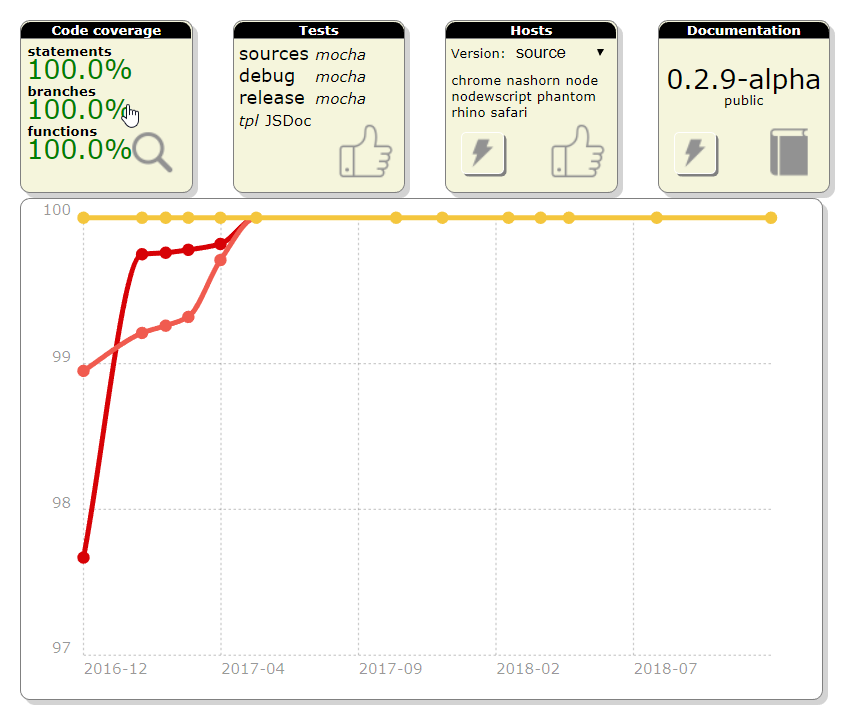
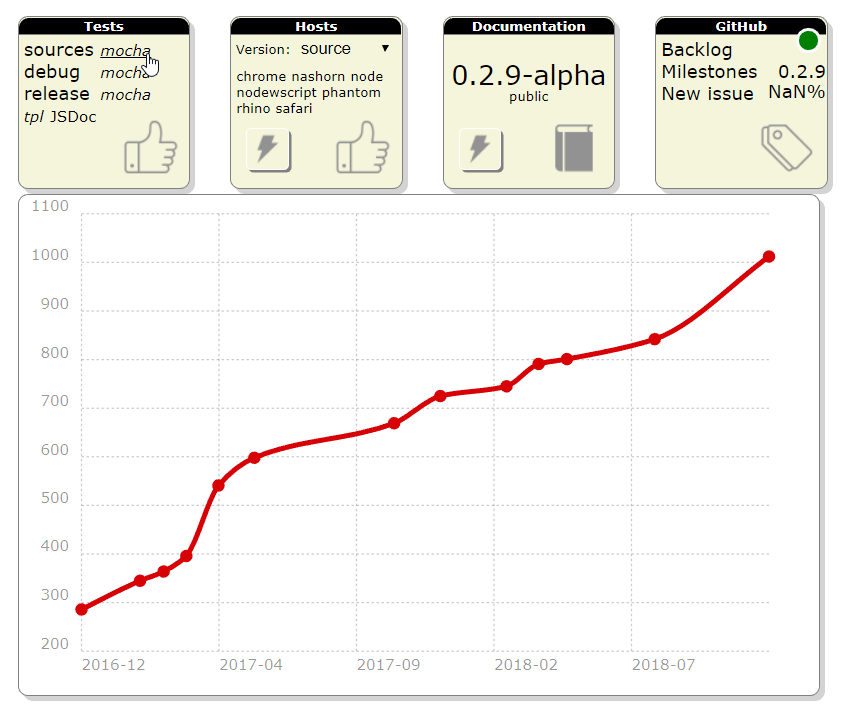
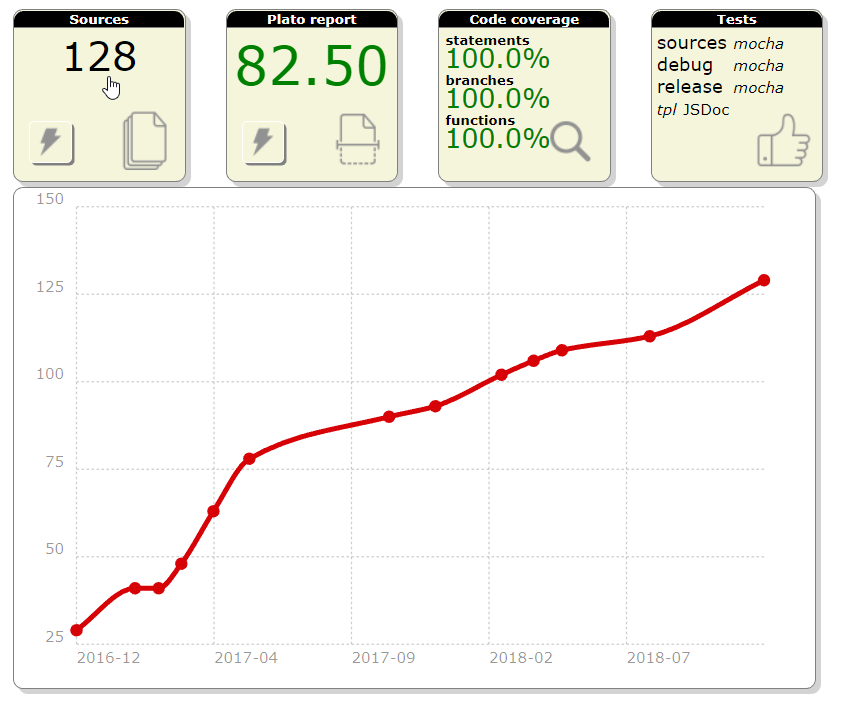
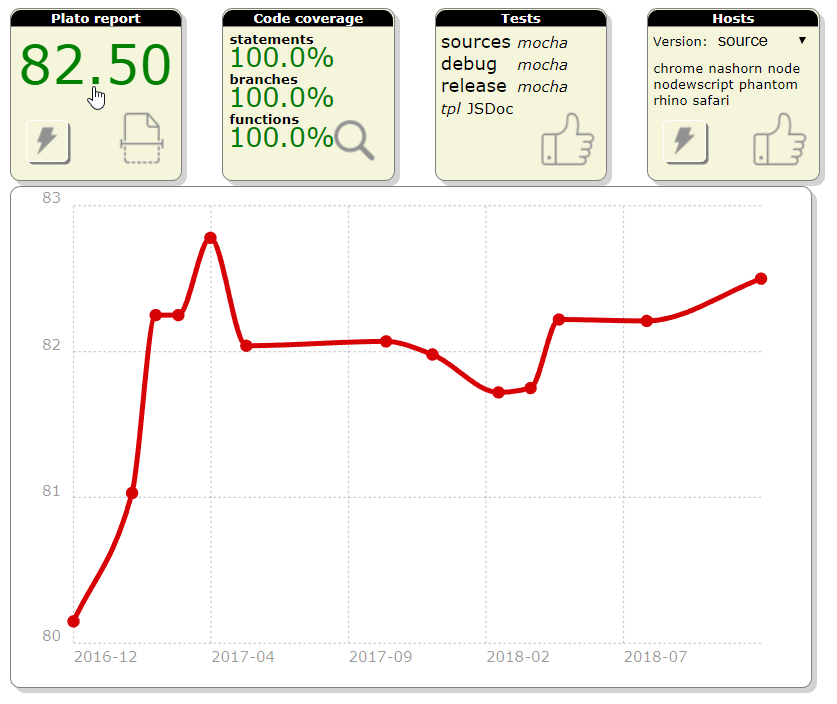
Using chartist.js, the dashboard tiles were modified to render a chart showing the progression of the metrics over the releases.
sources
sources

plato
plato

coverage
coverage

tests
tests

Documentation of ESLint rules

Automated documentation

Linting is used to statically validate the source code since the beginning of the project. The set of eslint rules has been refined over the releases and critical settings framed the way the sources look like.

Furthermore, the linter also evolves with time (and feedback) and some rules become obsolete as new ones are introduced.

In the end, it is really challenging to stay up-to-date and provide clear and complete explanations on the different rules that are configured (and why they are configured this way).

These are the problems that were addressed with the task #280.

As a result, a script leverages eslint's rules documentation to extract and validate the library settings. When needed, some details are provided.

The final result appears in the documentation in the Tutorials\Linting menu

no-magic-numbers

While documenting the rules, the no-magic-numbers one stood out.

I wanted to understand how this rule would (could?) improve the code. It was enabled to see how many magic numbers existed. Realizing that this generates a huge amount of errors, the check was turned off for test filesto start with).

Some people like to distinguish warnings and errors. However warnings do not call for action. As a result, they tend to last forever leading to the broken window effect. I prefer a binary approach meaning it is either OK or not OK.

It took almost one month of refactoring to remove them but, in the end, it did improve the code and lessons were learned.

This also demonstrated the value of having 100% of test coverage.

Lessons learned

Library + application

This may sound obvious but using the library as a support for an application gives immediate feedback on how the API is appropriate. It helps to keep the focus on how practical the methods are.

For instance, the helper gpf.serial.get was integrated in the library because its 10 little lines of code were repeated in the application.

Refactoring

It is not the first time that the whole library requires refactoring. And I actually like the exercise because it gives the opportunity to come back on old code that hasn't been touched in a while. Since the project started several years ago, my knowledge and skill have evolved and it gives a new look on the sources. Furthermore, the code being fully tested, there are very little risks.

When dealing with magic numbers, I realized that some patterns were obsolete because of JavaScript methods I was not used to. As the library offers a compatibility layer, it has been enriched with these new methods and the code modified consequently.

For instance: if (string.indexOf(otherString) === 0) is better replaced with: if (string.startsWith(otherString))

The same way: if (string.indexOf(otherString) !== -1) should be using: if (string.includes(otherString))

Last example, regular expressions are widely used with capturing groups. Their value is available in the array-like result through indexes. Using constants rather than numbers to get these values improves the code readability.

Next release

The next release content is not completely defined. There are plans to expand the use of attributes to ES6 classes and to integrate graaljs.

For the rest, it will depend on the side project since it needs all my attention.

Tuesday, August 7, 2018

Release 0.2.7: Quality and XML


This small release focuses on quality by integrating hosted automated code review services and introduces XML serialization.

Release 0.2.7: Quality and XML

Release content

A smaller release

As announced during the release of version 0.2.6, the month of June was busy developing a sample application to support the UICon'18 conference.

Unexpectedly, another interesting project emerged from this development but this will be detailed later on the blog.

In the end, the bandwidth was limited to work on this release.

XML Serialization

This version introduces the IXmlContentHandler interface as well as the gpf.xml.Writer class to enable XML writing.

If you are not familiar with the Simple API for XML, there are tons of existing implementation in different languages. The Java one is considered to be normative.

To put it in a nutshell, SAX proposes an interface to parse and generate XML.

The parsing part might be implemented later, only the generation one is required today.

Here is an example of an XML generation piped to a string buffer:

const writer = new gpf.xml.Writer(), output = new gpf.stream.WritableString(); gpf.stream.pipe(writer, output).then(() => { console.log(output.toString()); }); writer.startDocument() .then(() => writer.startElement("document")) .then(() => writer.startElement("a")) .then(() => writer.startElement("b")) .then(() => writer.endElement()) .then(() => writer.endElement()) .then(() => writer.startElement("c")) .then(() => writer.endElement()) .then(() => writer.endElement()) .then(() => writer.endDocument());

Which leads to the following output:

<document><a><b/></a><c/></document>

Representing the following structure:

document
|
+- a
|  |
|  +- b
|
+- c

Since all the methods returns a promise, the syntax is quite tedious. When writing the first tests, it quickly became clear that its complexity could be greatly reduced by augmenting the result promise with the interface methods.

As a result, a wrapper was designed to simplify the tests leading to this improved syntax:

const writer = new gpf.xml.Writer(), output = new gpf.stream.WritableString(); gpf.stream.pipe(writer, output).then(() => { console.log(output.toString()); }); wrap(writer).startDocument() .startElement("document") .startElement("a") .startElement("b") .endElement() .endElement() .startElement("c") .endElement() .endElement() .endDocument();

This will surely be standardized in a future version.

Improved gpf.require

Preloading

The goal of the library is to support application development. As explained in the article My own require implementation, splitting the code into modules enforces better code. However, at some point, all these modules must be consolidated to speed up the application loading.

This version offers the possibility to preload the sources by passing a dictionary mapping the resources path to their textual content. As a result, when the resource is required, it does not need to be loaded.

Here is the proposed bootstrap implementation:

gpf.http.get("preload.json") .then(function (response) { if (response.status === 200) { return JSON.parse(response.responseText); } return Promise.reject(); }) .then(function (preload) { gpf.require.configure({ preload: preload }); }) .catch(function (reason) { // Document and/or absorb errors }) .then(function () { gpf.require.define({ app: "app.js" // Might be preloaded }, function (require) { require.app.start(); }); });

Modern browsers

One of the challenges of building a feature-specific version of the library (a.k.a. flavor) is to test it with modern browsers only. The compatibility layer of the library takes a significant part of it and is useless if the flavor's target is NodeJS or any recent browser.

Worst, while building the release, the tests were failing when 'old' browsers were configured.

So, the concurrent task was modified to include a condition on modern browsers.

These are considered modern:

  • Chrome
  • Firefox
  • Safari (if on Mac)

Quality improvement

Abstract classes

Quality is also about providing tools to make sure that developers don't make mistake. Abstract classes concept is one of them. This version offers the possibility to create abstract classes by adding $abstract in their definition.

If one wants to deal with abstract methods, they can be defined with gpf.Error.abstractMethod. However, this won't prevent class instantiation.

Debugging with sources

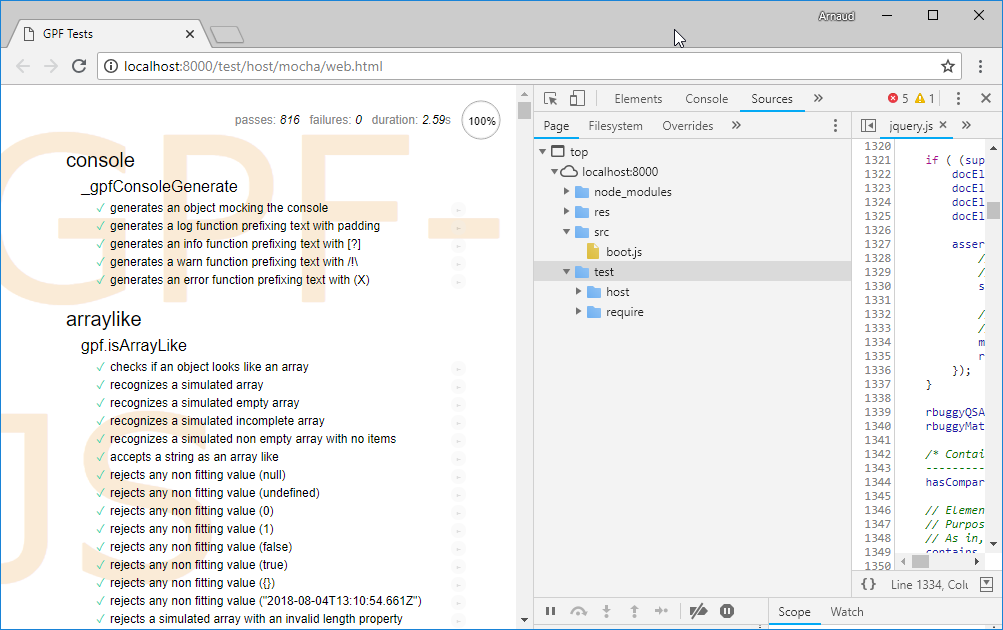
Debugging the library can be laborious. I am more familiar with Chrome development tools and I sometimes use them with NodeJS. Because the sources are loading through the evil-ish use of eval, they don't appear in the debugger sources tab.

No sources
No sources

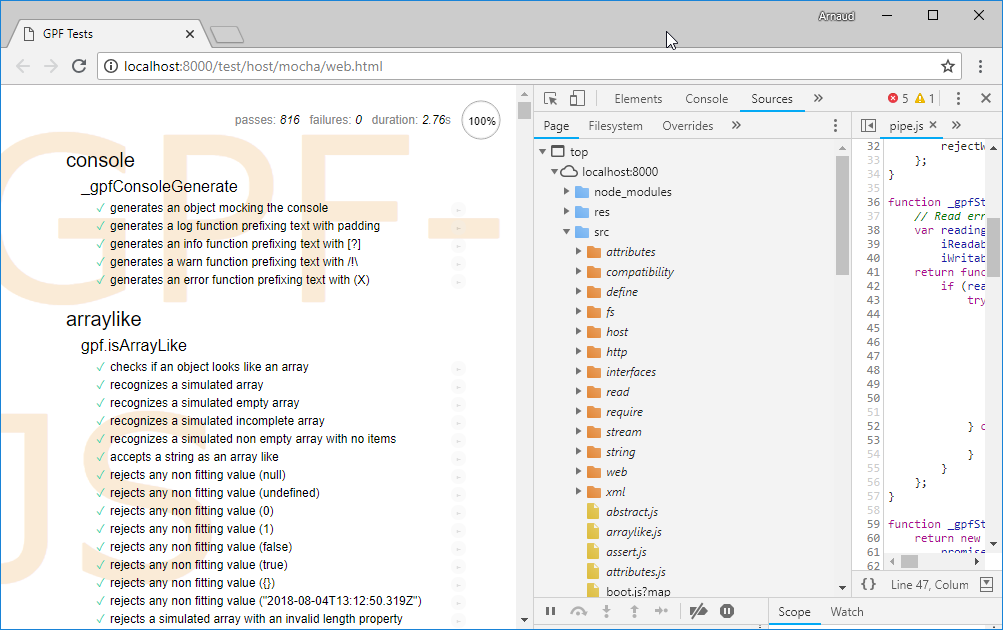
To solve that problem, source maps were applied.

To put it in a nutshell:

As a result, sources appear:

With sources
With sources

Hosted automated code review

GitHub is a huge source of information. While browsing some repositories, I discovered two code review services that integrates nicely.

They both focus on code quality (based on static checks) and propose exhaustive report on potential issues or code smells found in your code.

Today, only the src folder of the repository is submitted for review.

It revealed some interesting issues such as:

  • Code similarities, i.e. opportunity for code refactoring
  • Code complexities:

Some were already known and have been addressed in this version (in particular src/compatibility/promise.js where plato was giving a little 74.46).

The surprise came from a class definition with more than 20 methods as it was considered an issue (src/xml/writer.js). After having diligently improved the code, by isolating the XML validation helpers, one must admit that it makes things more readable !

Finally, these tools rank the overall quality with a score that can be inserted in the project readme.

Quality scores
Quality scores

Lessons learned

From a pure development prospective, a lot was done in a very limited time. Since the quality of the code is enforced by the usual best practices (TDD, static code validation) but also measured (with plato), modifications are safe and immediately validated.

A lot was learned on JavaScript source mappings since it was required to enable debugging in the browser.

The relevance of the problems raised by the Code Climate tool was quit surprising: the overall project quality benefited from this integration.

Next release

The next release content is not even defined. For the next months, I will focus on a side project that requires all my attention.

Saturday, May 12, 2018

Release 0.2.6: gpf.require.js


This release fixes sporadic Travis issues, improves the modularization helper and finalizes the flavor mechanism to deliver the first reduced version of the library (gpf.require.js).

New version

Here comes the new version:

Release content

Sporadic Travis issues

From time to time, the Travis continuous integration build was failing with a message indicating that the coverage information was missing for the browser. Here is a recent example.

I was first suspecting the concurrent execution of quality checks to be the root cause of the issue. I disabled it but, still, the problem persisted.

So, I took a closer look on how the coverage information was generated while executing tests in the browser.

In the Travis environment, chrome is spawned as a command line with options to disable user interface. When the tests are completed, an AJAX request is triggered to save the tests results through the cache middleware. In the meantime a command line, responsible of spawning the browser, waits for the cache to be updated before closing the process.

Also, the test page is responsible of saving the coverage information through another AJAX request that goes to fs middleware.

I realized that the sequence was incorrect: the tests results were sent before the coverage information. The two steps are now executed in the correct order.

Improved gpf.require namespace

The modularization helper was improved following the feedback obtained after the first use:

gpf.require.js

Flavor specification

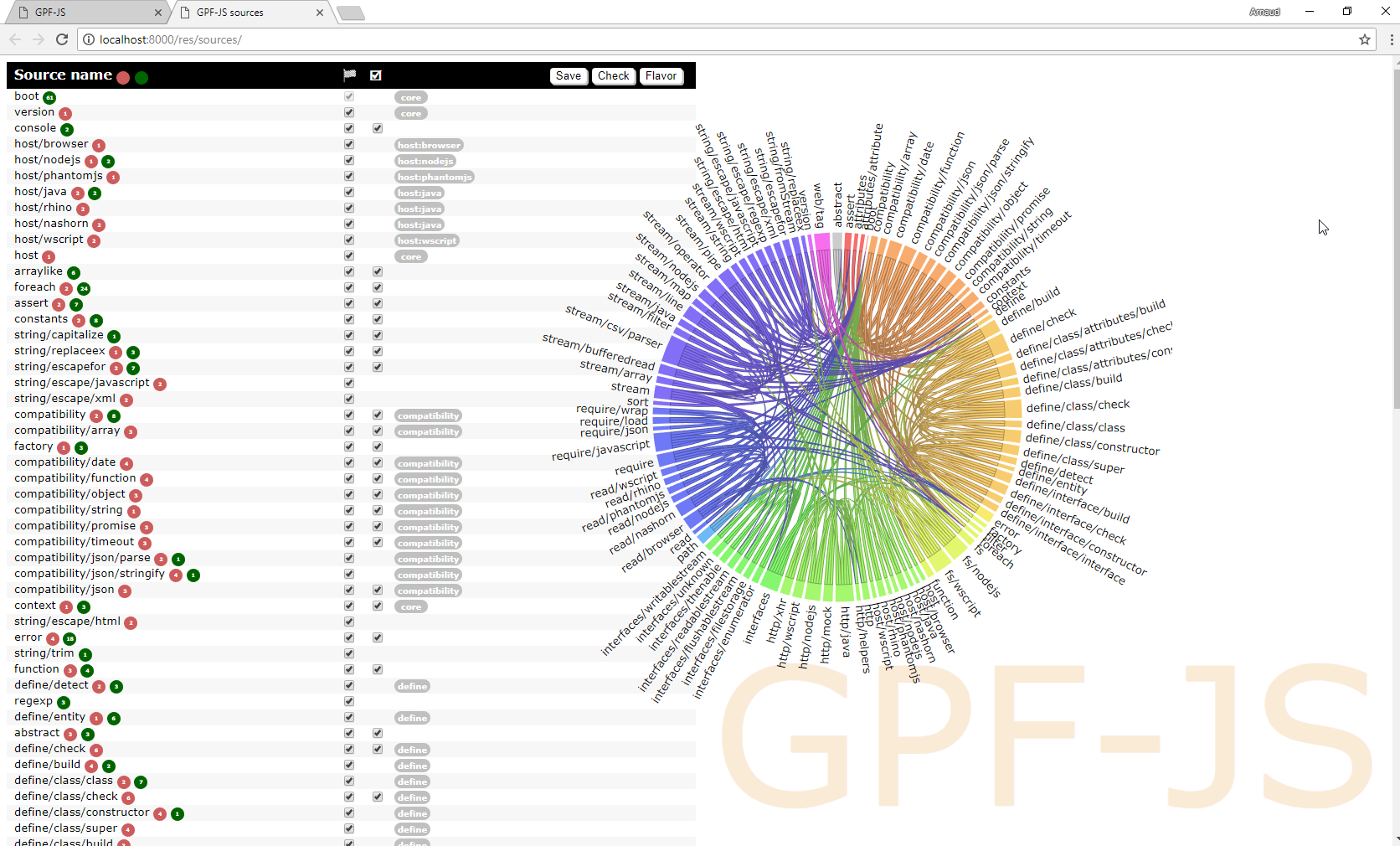
In the previous version, the dependency wheel was added to the source tile to give a visual representation of the dependencies. Also, each source file has been documented with 'tags' qualifying the feature or the host the source relates to.

Sources without any flavor selection

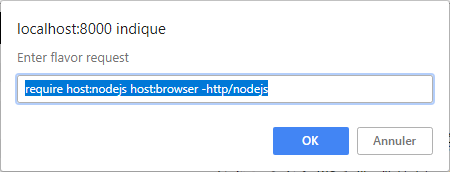
Also, in the previous version, a syntax was initiated to instruct, in a readable way, which sources should be kept for a given flavor. Combining the features list, hosts specification and dependencies, an algorithm - not my proudest one - is capable of generating an array of booleans filtering the list of sources.

Example of flavor syntax

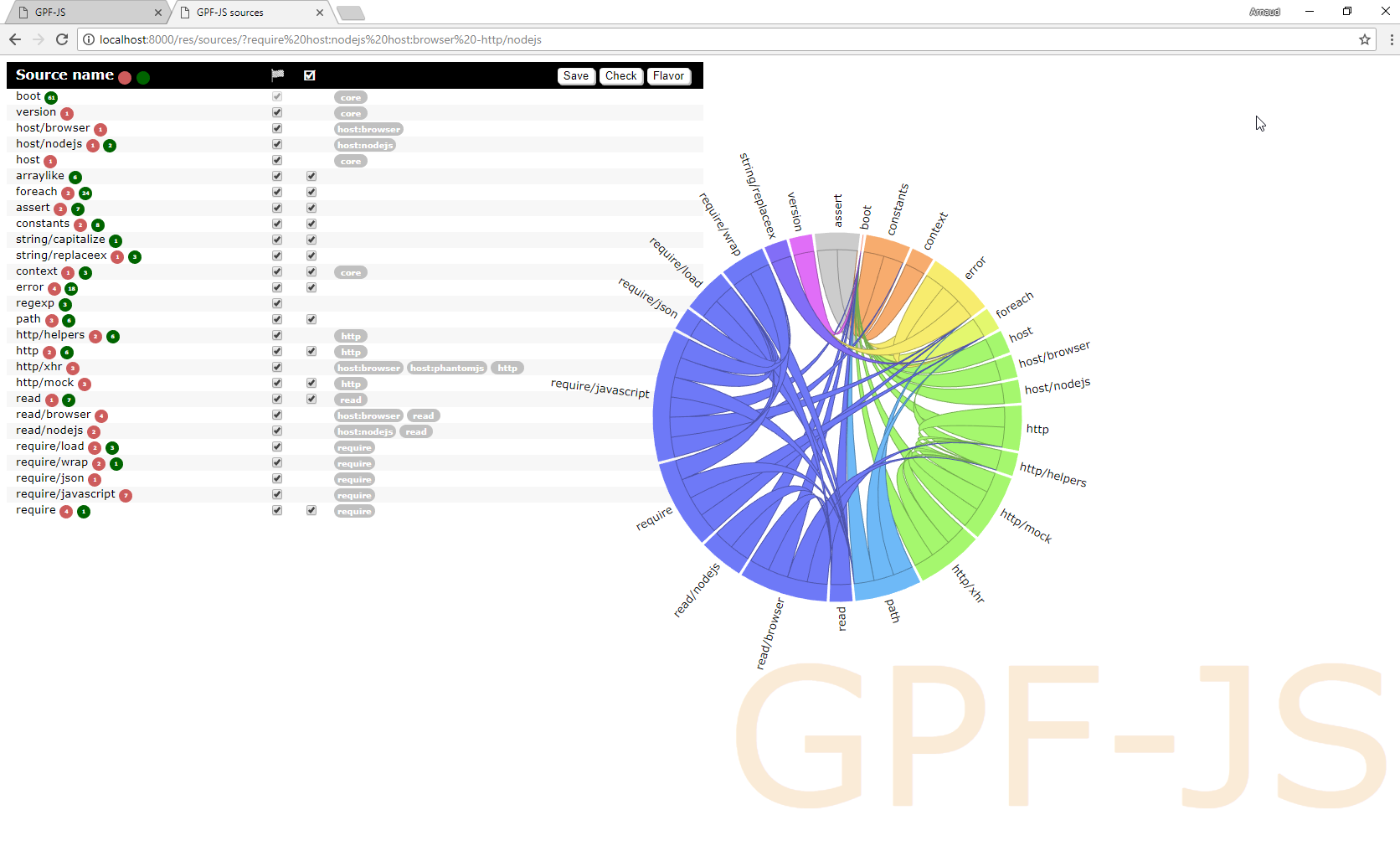
As a result, the list of sources is reduced to meet the flavor specification.

Sources with a flavor selection

Everything was ready to setup the require flavor specification, it contains:

  • The version in which the flavor was introduced: it is required to build the versions table in the readme page
  • The flavor filter string
  • The tests required to validate the flavor
  • A functional description of the flavor: it will be used to document flavors (not yet implemented)
  • A technical description of the exposed API: the goal is to narrow down the list of namespaces / methods that are exposed by the flavor (not yet implemented)

Reducing flavor size

The very first results were quite disappointing:

  • The same way, Browser implementation of require depends on gpf.http to load the resource content. This namespace offers a mocking helper that is not needed for require. The code had to be drastically changed to successfully unplug this source.

Testing the flavor

There is no way the flavor could be officially released without making sure it works as expected. Luckily, the whole library is already 100% tested. Since the flavor description lists the test files to run, the development framework was altered to support a flavor parameter that:

Mostly, the following files were modified:

Obviously, the grunt make task that schedules all the tasks required to build the version was also modified.

Lessons learned

Creating this first flavor was quite an interesting challenge and it took longer than expected. It forced me to rethink the way the code is articulated, especially with regards to host specific implementations.

The original pattern consisted in dictionaries containing operations indexed by host name. However, this had a major drawback: every time it was accessed, it was uselessly impacting the performances and producing complex code.

Now, when appropriate, a new helper is introduced to define the proper implementation depending on the host.

Here is the gpf.http use case:

Regarding gpf.http.mock, I decided to plug it in the gpf.http implementation only when loaded, improving its modularity.

All this work paid, the maintainability ratio increased to 82.22.

One last thing, the require flavor supports only 'modern' browsers meaning the ones where the compatibility layer is not required. However, as of now, the development framework does not distinguish the configured browsers.

A configuration will be defined.

Next release

The next release content is not yet clearly defined. Since I will participate to UICon'18 as a presenter, I will first focus on delivering a good presentation.

I expect to work again on the library after June.

Wednesday, April 18, 2018

Friday, April 6, 2018

Release 0.2.5: Flavors

This release finalizes WScript simulation required for Travis, it improves the development environment and it introduces a mechanism to deliver smaller feature-centric versions of the library.

New version

Here comes the new version:

Release content

Finalized WScript simulation

In the previous release, Travis continuous integration platform was integrated. To assess that all hosts are working fine, WScript had to be simulated because not supported on Linux environments.

At that time, the result was not perfect and the coverage was reaching only 99% (including the documented exceptions).

To achieve 100%, the environment is now tweaked to disable standard objects and let the compatibility layer replace them with polyfills.

An unexpected test case

The simulation is based on the sync-request external library that implements synchronous HTTP requests in NodeJS. After enabling the JSON polyfills, the tests were failing... because of this library.

It revealed two problems:

  • The JSON emulation was incomplete
  • The compatibility tests were not covering all features of the JSON object

Universal Module Definition

After fixing the polyfills problems (see below), the final validation consisted in running the debug and release versions of the library inside the WScript simulator.

However, those versions are based on the concatenation of all sources with the Universal Module Loader.

This mechanism detects the current host and defines the gpf symbol accordingly.

When NodeJS is detected, which is the case here, the loader assigns the gpf namespace to module.exports to be the result of a require call.

But in WScript, the library is supposed to define the gpf symbol globally.

A workaround was implemented to simulate this behavior, it is done by leveraging the AMD syntax.

Improved JSON polyfill

The JSON.parse method accepts a reviver parameter that is used to transform parsed values before the final value is returned.

New tests were added and the missing part was implemented.

The same way, the JSON.stringify method accepts two additional parameters:

  • One, documented as replacer, that can be either a function to transform values before the stringification process or an array of string that serves as a whitelist of properties to be included in the final string.
  • A formatting parameter, documented as space, that is used to beautify the output of the method.

New tests were added and the missing parts were implemented.

Improved development environment

In this release, a significant effort was put in the development environment.

sources.json

The sources.json file is the spinal column of the library. It defines which sources are loaded and additional properties can be associated to them.

For instance, the "test" attribute defines when the associated test file (same name but under test instead of src) should be loaded. The default value being true, only the sources with no test file are flagged with false (for example).

The sources list was recently cleaned up for DeepScan. As a result, the remaining sources were all containing documentation to extract. Consequently, the "doc" attribute has been removed.

Also, a space separated list of tags was added, where:

  • core means the source is a core feature and it must always be loaded
  • host:hostname means the source is specific to the host hostname
  • any other tag is interpreted as a feature name (for instance: define, require, fs...)

This is used for the flavors development that will be detailed right after.

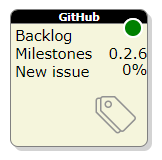
GitHub tile

A new tile was added to the development dashboard.

The GitHub tile
The GitHub tile

It connects to the GitHub API to fetch the current release progress and links directly to it.

This was also the opportunity to redesign the whole dashboard. All the HTML is now generated and modules are organized thanks to the gpf.require.define feature.

Documentation validation

The only way to make sure that all links contained in the documentation are actually pointing to something is to try them. A new step in the build process was added to validate the documentation by checking all the links.

Here again, it was a nice opportunity to test the gpf.http feature.

Dependency viewer

The sources page was redesigned to visually show dependencies. It was done thanks to the awesome dependency wheel from Francois Zaninotto.

Simplified release

Last but not least, the library is now completely released through a single command line.

Flavors

The library starts to generate interest but people often complain about the fact that it handles too many hosts and, consequently, it's too big.

Furthermore, some internal mechanics generate troubles:

  • The use of ActiveXObject may generate security issues on Internet Explorer
  • require("js") produces extra work with webpack
  • ...

Hence, some time was invested to study the ability to build smaller - more dedicated - versions by having a way to specify which parts to consolidate in the library.

The idea is to rely on feature tags.

For instance, if one wants to use require on NodeJS only, the flavor would be "require host:nodejs". From there, an algorithm is capable of listing all the sources that must be included by:

  • filtering sources from tags
  • adding selected sources' dependencies

Mapping stream

This release delivers a mapping stream that completes the filtering stream introduced in the last version.

Here is a modified version of the previous release's sample that includes mapping:

// Reading a CSV file and keep only some records /*global Record*/ var csvFile = gpf.fs.getFileStorage() .openTextStream("file.csv", gpf.fs.openFor.reading), lineAdapter = new gpf.stream.LineAdapter(), csvParser = new gpf.stream.csv.Parser(), filter = new gpf.stream.Filter(function (record) { return record.FIELD === "expected value"; }), map = new gpf.stream.Map(function (record) { return new Record(record); }) output = new gpf.stream.WritableArray(); // csvFile -> lineAdapter -> csvParser -> filter -> map -> output gpf.stream.pipe(csvFile, lineAdapter, csvParser, filter, map, output) .then(function () { return output.toArray(); }) .then(function (records) { // process records });

See how you can easily swap the streams to refactor the code: let say that the Record class has a method named isObsolete which gives the filtering condition. You don't need to rely on the CSV literal object properties to reproduce the logic:

// Reading a CSV file and keep only some records /*global Record*/ var csvFile = gpf.fs.getFileStorage() .openTextStream("file.csv", gpf.fs.openFor.reading), lineAdapter = new gpf.stream.LineAdapter(), csvParser = new gpf.stream.csv.Parser(), filter = new gpf.stream.Filter(function (record) { return !record.isObsolete(); }), map = new gpf.stream.Map(function (record) { return new Record(record); }) output = new gpf.stream.WritableArray(); // csvFile -> lineAdapter -> csvParser -> map -> filter -> output gpf.stream.pipe(csvFile, lineAdapter, csvParser, map, filter, output) .then(function () { return output.toArray(); }) .then(function (records) { // process records });

Lessons learned

This release enabled a 'real' productive use of the library. And, naturally, several weaknesses were identified.

For instance, requests to HTTPS websites were not working with NodeJS.

The same way, the usability of the gpf.require.define feature has to be improved whenever something goes wrong.

If loading fails because the resource file does not exist or its evaluation generates an error, the resulting exception must help the developer to quickly find and fix the problem:

  • Which resource is concerned?
  • Through which intermediate resources it was loaded?
  • What is the problem?
  • Where is the problem (line number)?

Also, debugging loaded module might become a challenge since the evaluation model prevents the browser to map the file in the debugger.

But, in the end, this exercise validated the concepts: the tiles were quickly redesigned and common code put in modules that are shared by all of them:

Next release

The next release content will mostly focus on:

  • Taking care of improving gpf.define.require
  • Releasing a standalone version of the gpf.define.require feature
  • Offering Object Oriented concepts (abstract classes, singletons, final classes)
  • Documenting JSON compatibility

Friday, March 2, 2018

Release 0.2.4: Attributes

This release increases quality, it provides a new streaming tool and it introduces attributes. Last but not least, a new scriping host was added to the supported list: Nashorn.

New version

Released right on time, here comes the new version:

Release content

Leftovers on gpf.require.define

When writing the article My own require implementation, the handling of JavaScript modules was split in two distinct parts:

  • CommonJS handling (mostly because of synchronous requires)
  • AMD / GPF handling (because asynchronous)

Furthermore, 'simple' CommonJS modules (i.e. no require with just exports) were not supported.

Those problems were addressed by fixing the issue #219.

Quality focus

A significant effort was put in quality:

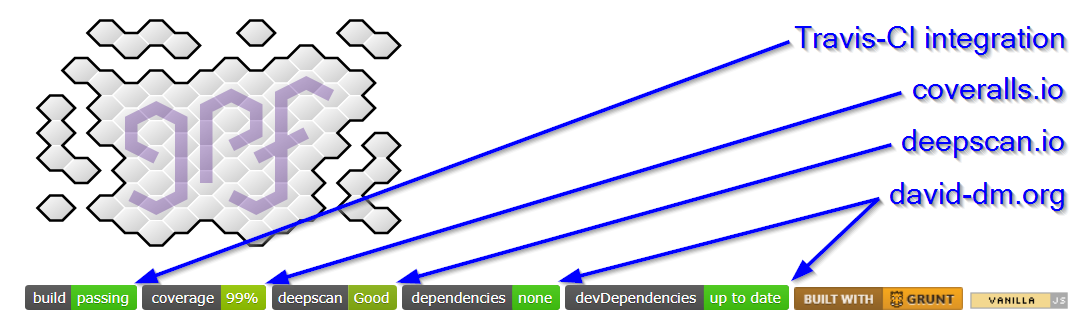
This is all explained in the article Travis integration.

GPF-JS quality
GPF-JS quality

Nashorn support

Nashorn is another JavaScript engine implemented in Java. It's like Rhino's little brother: it's faster and delivered with Java Runtime Environment.

This new Java host made me realize that the gpf.rhino namespace was badly named. it has been deprecated it to the benefit of the gpf.java namespace.

Filtering stream

Previous release introduced gpf.stream.pipe to chain streams together.

This release delivers a filtering processor that forwards or blocks data based on a filtering function. Here is a modified version of the previous release's sample that includes filtering:

// Reading a CSV file and keep only some records var csvFile = gpf.fs.getFileStorage() .openTextStream("file.csv", gpf.fs.openFor.reading), lineAdapter = new gpf.stream.LineAdapter(), csvParser = new gpf.stream.csv.Parser(), filter = new gpf.stream.Filter(function (record) { return record.FIELD === "expected value"; }), output = new gpf.stream.WritableArray(); // csvFile -> lineAdapter -> csvParser -> filter -> output gpf.stream.pipe(csvFile, lineAdapter, csvParser, filter, output) .then(function () { return output.toArray(); }) .then(function (records) { // process records });

Attributes

Back to 2016, an article to introduce GPF-JS was written and it explains the concepts that were expected in the library: classes, interfaces and attributes.

The last pillar is introduced in this release.

It all starts by its simpler aspects:

More features will come soon but this rewriting is very exciting as it fixes all the issues of the initial draft (developed in 2015).

Improved development environment

It is now possible to use an authentication token to connect to the GitHub platform (previously user and password were required). It opens the door for a new tile in the dashboard to speed up development.

This is already enabled in the release process which has also been improved to prepare the following version in its final step. Unfortunately, the command line failed when testing it on this release and the remaining steps were finished manually

...which demonstrates how much value automation brings in this procedure...

Lessons learned

If it's not tested, it doesn't work. This was confirmed with Travis integration where the tools were run for the first time on a non-Windows environment.

The build process is taking longer, for two reasons:

  • There is a new host to test (Nashorn)
  • The library now has 9 legacy test files

A strategy will be decided to reduce the number of tests being run.

With the integration of Deepscan.io, a lot of cleaning has been applied because there is no easy way to exclude specific files from the tool (other than naming them one by one). All the unused files were moved from src & test to the new lost+found folder.

Next release

The library becoming more complex (and bigger), it might evolve to propose several 'flavors'. The goal would be to provide smaller / dedicated versions that cut in the feature set.

For instance, a modern browser version could see the file system management removed as well as the compatibility layer.

Today, the dependencies.json file enumerates module dependencies. To be able to isolate them, a more accurate view is required and some modifications must be done inside the sources.json file.

The next release content will mostly focus on:

  • Documenting attributes
  • Refining the WScript simulation
  • Improving the development framework (illustrate the versions)
  • Adding a new stream helper to transform records

Thursday, March 1, 2018

Travis integration


This article summarizes how Travis CI was plugged into the GPF-JS GitHub repository to assess quality on every push.
Quality control

Since the beginning of the GPF-JS project, quality is a high priority topic.

Over the years, a complete development and testing framework has been built:

  • Development follows TDD principles
  • The code is linted with eslint (also with jshint, even if it is redundant)
  • The maintainability ratio is computed using plato and verified through custom threshold values
  • Testing is done with all supported hosts
  • The coverage level is measured and controlled with custom threshold values
  • A web dashboard displays the metrics and gives access to the tools

However, these validations were done locally and they had to be run manually before pushing the code.

To enable collaboration and ensure that all pull requests would go to the same validation process, an continuous integration platform was required.

Another approach consists in creating git hooks to force the quality assessment before pushing. However, it requires the submitting platform to be properly configured. Having a central place where all the tests are being run guarantees the correct and unbiased execution of the tests.

Travis CI

Travis-CI is a free solution that integrates smoothly with GitHub. Actually, the GitHub credentials are used to login to the platform.

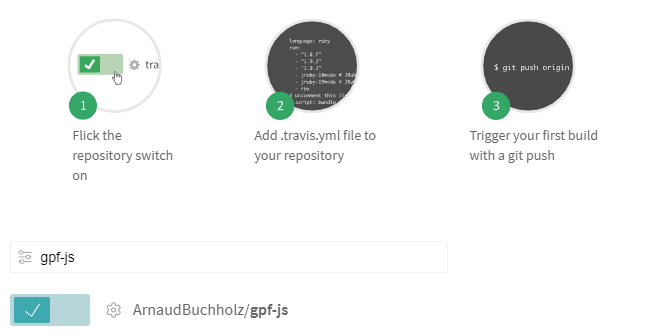
After authentication, all the repositories are made available to Travis and each one can be enabled individually.

Documented steps
Documented steps

The selected repositories must be configured to instruct Travis on how the builds are done. To put it in a nutshell, a new file (.travis.yml) must be added.

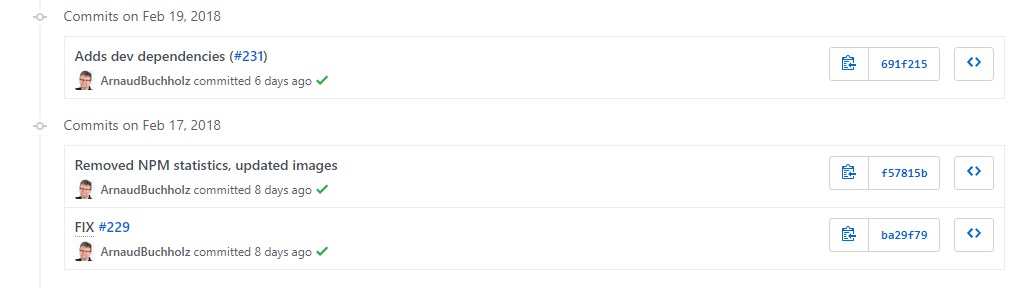
Once everything is put together, the platform will monitor pushes and trigger builds automatically. Eventually, it documents the push in GitHub with a flag indicating if the build succeeded.

Successful builds
Successful builds

When opening the Travis website, the user is welcomed with a nice dashboard listing the enabled repositories with their respective status.

Travis dashboard
Travis dashboard
.

The project README can be modified to show the last build result using an image delivered by the Travis infrastructure:

Changes in GPF-JS

.travis.yml

The .yml extension stands for YAML file: a structured format that is commonly used for configuration files. In the context of Travis, it describes the requirements and steps to build and validate the project.

Requirements

One obvious requirement of the GPF-JS development environment is NodeJS. This is configured by defining the language setting and selecting the Long Term Support version.

Chrome is also required to enable browser testing.

Grunt is installed using the proper command line.

The remaining requirements are described by the project dependencies and are installed through NPM.

Steps

The default step being executed by Travis is npm test

The resulting command line is specified in the package.json file; it executes grunt with the following tasks:

  • connectIf to setup a local web server necessary for browser and gpf.http testing
  • concurrent:source to execute all tests with the source version (see library testing tutorial)

But, first, the GPF-JS development environment requires a configuration file to be generated: it contains the list of detected hosts, the metrics thresholds and the HTTP port to be used to serve files.

Configuration

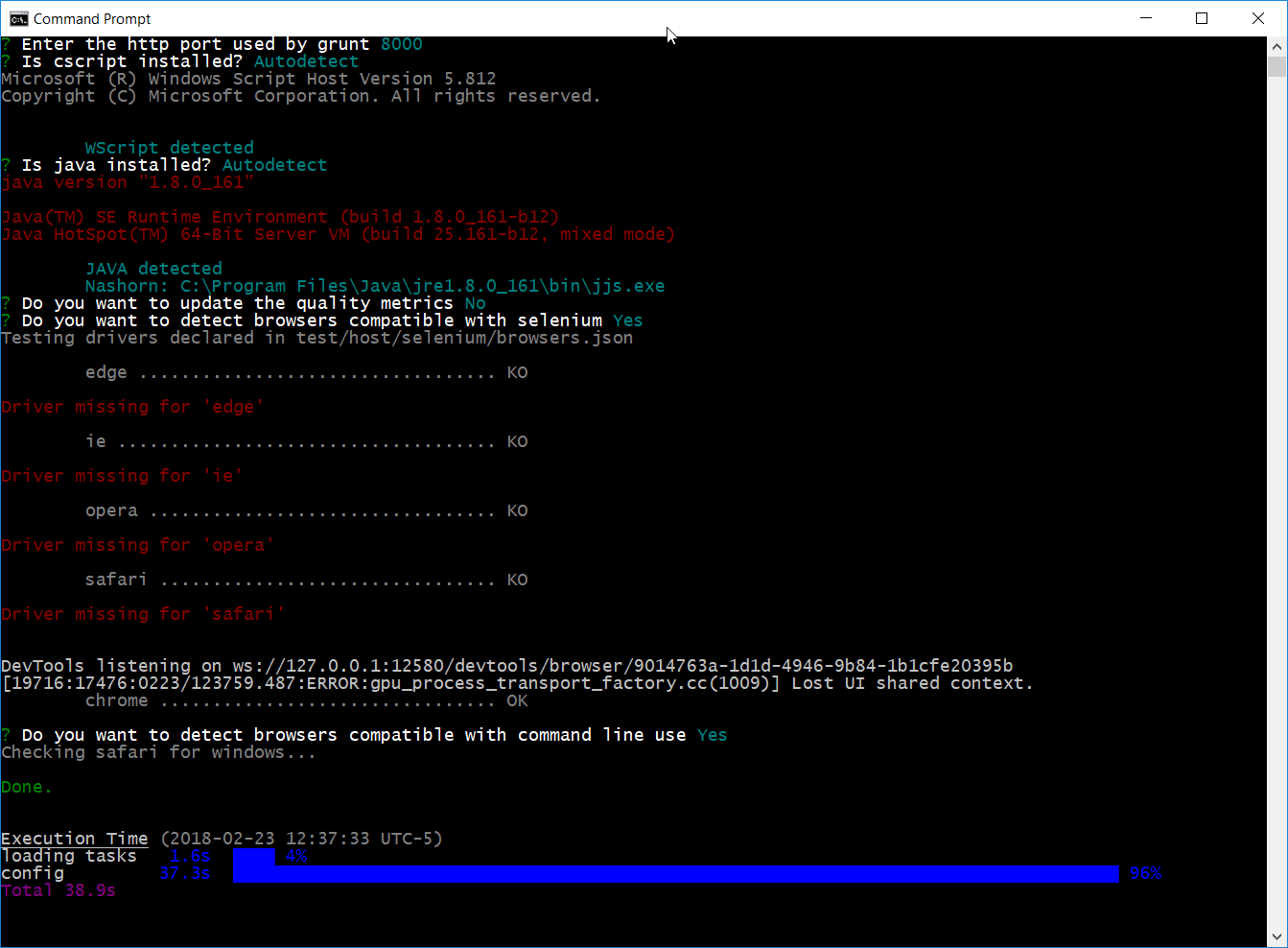
The configuration file is interactively created the very first time the grunt command is being executed. Indeed, the user input is expected to approve or change some values (such as the HTTP port).

Grunt config
Grunt config

However, on Travis, no user can answer the questions. Hence, the tool must be fully automatic.

When grunt is triggered, the gruntfile.js first checks if any configuration file already exist. If not, a default task takes place to run the configuration tool.

To support Travis, this default task processing was isolated in a folder of 'first-launch' configuration tasks. The name of the file is used to name the task.

The configuration tool was then modified to handle a so-called quiet mode and the Travis configuration task leverages this option. Additionally, the task also executes the quality tasks (linters, plato & coverage).

So, the command grunt travis is executed before the testing step to ensure the existence of the configuration file.

Challenges

After figuring out the different steps, a long debugging session - mostly composed of try and fail cycles - was required to figure out the specificities of the platform.

The history of pushes on the Travis integration issue illustrates all the attempts that were made.

Non-Windows environment

"If it's not tested, it doesn't work"

The very first issue was related to the environment itself. The development being made on Windows, the library has never been tested with a different operating system before.

Travis offers the possibility to use different flavors but the default one is Linux.

As a consequence, some scripts were adapted to handle the differences in the path separator (for instance).

NodeJS can absorb those differences. This is the reason why the library uses the / as a path separator but translates back to \ when running on Windows-specific host.

Browser testing

Another issue was related to browser testing. As a matter of fact, the Travis environment does not provide any graphical user interface by default. This being said, it means that you can't start a browser.

Fortunately, this is explained in the Travis documentation where several options are proposed.

And, luckily, the GPF-JS development environment provides an alternate way to test browsers.

Consequently, the headless mode of chrome is used.

Wscript

The operating system being Linux, the Microsoft Scripting Host is not available.

Unlike path separators, it is a normal situation as the configuration file includes a flag that is set upon detection of this scripting host.

However, one unexpected effect is bound to the code coverage measurement: a big part of the library is dedicated to bring older hosts to a common feature set and WScript was running most of it. Thus, the coverage minimum was not reached and the build was failing.

This was temporarily addressed by disabling the coverage threshold errors.

Also, thanks to the Wscript emulator project from Mischa Rodermond, a simple simulator implemented with node validates the WScript specifics.

There are still some uncovered part, but they will be fixed in a future release.

Other goodies

After digging through GitHub projects, I also discovered and integrated the coveralls package which can be used in conjunction with Travis so that coverage statistics are uploaded on a dedicated board.

I also added a dependency checker as well as a code quality checker (which required some cleaning).

Everything is visible from the project readme.

GPF-JS quality
GPF-JS quality