Friday, January 30, 2015

Code Analysis

Sometimes, you have to put in place tools to make sure that the code respects the best practices and guidelines. Some very good ones already exist (in particular the code linters).
In this article, I will introduce you to esprima that allows a deep and precise code analysis.
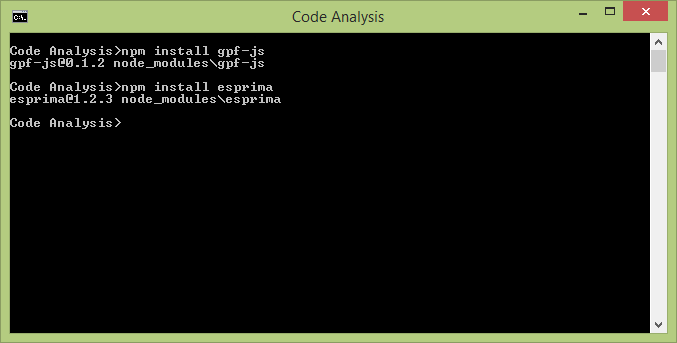
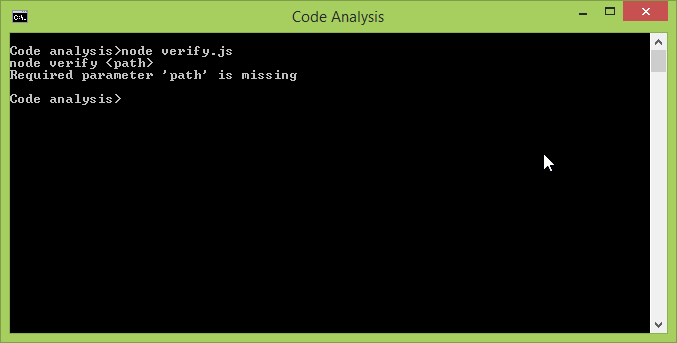
### Linting is necessary... In a previous post, I have been talking about the benefits of using [code linting tools](http://gpf-js.blogspot.ca/2013/11/ why-lint-tool-can-reduce-development.html) as it really saves the developer time during the coding phase: * It highlights common mistakes (undeclared variables, unused parameters, use of [hasOwnProperty](https://developer.mozilla.org/en-US/docs/Web/JavaScript/ Reference/Global_Objects/Object/hasOwnProperty), == vs ===...) * It maintains code consistency (formatting, naming conventions...) * It checks code complexity, in particular the [cyclomatic complexity](http:// en.wikipedia.org/wiki/Cyclomatic_complexity) Regarding JavaScript, in my opinion, one of the best options is to apply [JSHint](http://www.jshint.com/). In the following example, several errors are raised because of: * quotes inconsistencies * undeclared functions (let say they are declared in other sources) * missing semicolon * undeclared or improper variable names * ... Move your mouse over the underlined errors to read them *(note that this is using live JSHint parsing)*. `(function () {/*gpf:apply-jshint*/ "use strict"; // Handles the click on a specific button function on_click (ctrl) { freezeInterface("Please wait, updating information...") $.ajax ('getInformation.aspx', { success: function (data) { resultCode = data.resultCode; if (resultCode == 0) updateInterfaceUsingData(data); } }) unfreezeInterface(); } document.getElementById('myButton') .addEventListener("click", on_click); })();` ### ...but not sufficient However, this kind of tool has limits as it tends to apply general validation rules without considering the meaning of the code that is executed. To illustrate the problem, let me first fix the JSHint errors: `(function () {/*gpf:apply-jshint*/ "use strict"; /*global $, freezeInterface, updateInterfaceUsingData, unfreezeInterface*/ // Handles the click on a specific button function onClick () { freezeInterface("Please wait, updating information..."); $.ajax("getInformation.aspx", { success: function (data) { var resultCode = data.resultCode; if (resultCode === 0) { updateInterfaceUsingData(data); } } }); unfreezeInterface(); } document.getElementById("myButton") .addEventListener("click", onClick); })();` Using the "global" comment, JSHint is configured to be aware of the global variables to be defined. With this declaration, the code successfully passes JSHint validation. But do you see any problem here? ... no? ... really? ... ### Incorrect use of the API The method **[$.ajax](http://api.jquery.com/jquery.ajax/)** comes from the [jQuery](http://jquery.com/) framework and it encapsulates the necessary code to handle AJAX calls with the server. There are two important things to remember about AJAX calls: * They are asynchronous: this is why callbacks are used to be notified when the answer comes back from the server. * Like any function call, they may generate errors: either because the API that was invoked can't provide the requested result or because a network failure prevents the call to complete. Consequently, there are two problems with the way the method **onClick** is implemented: * The use of **unfreezeInterface** is done right after the call to **$.ajax**. It means that it does not even wait for the call to succeed. * Furthermore, if the call fails, nothing will happen. The error is ignored. There are some situations where it is acceptable to ignore errors but, in a general manner, all errors must be handled. ### Understanding the code To detect such a misconception, one must first locate any function call to **$.ajax** and then analyze the parameters to verify that it has been used the right way. One easy solution could be to consider the whole source as a big string, look for "$.ajax" and then check that the "success" as well as the "error" keywords appear just after. But how reliable is that? `(function () {/*gpf:apply-jshint*/ "use strict"; /*global $, freezeInterface, updateInterfaceUsingData, unfreezeInterface*/ /*global showError*/ // Handles the click on a specific button function onClick () { freezeInterface("Please wait, updating information..."); $.ajax("getInformation.aspx", { success: function (data) { var resultCode = data.resultCode; if (resultCode === 0) { updateInterfaceUsingData(data); } else { // The 'error' keyword is here but inside a string showError("An error occurred"); } } }); unfreezeInterface(); } document.getElementById("myButton") .addEventListener("click", onClick); })();` In the above example, the "error" keyword appears in a comment and a string. Furthermore, how can you make sure that no instruction is executed after the call to **$.ajax**? ### Parsing the code The only good way to understand the JavaScript code is to parse the source in order to build a structured representation of the instructions it contains. Consequently, the **$.ajax** would appear as a function call and it would be possible to enumerate and check its parameters. In particular, we could verify that the second one is an object with a member named "error". JavaScript parsing is a wide topic... In my [library](https://github.com/ ArnaudBuchholz/gpf-js), I created a [tokenizer](https://github.com/ ArnaudBuchholz/gpf-js/blob/master/tokenizer.js) that is used in this website to apply syntax coloring but it does not really provides the program structure: it just identifies the keywords, strings, comments and symbols. ### esprima: a free JavaScript parser Fortunately, there are existing libraries that do the job for you. I will focus on [esprima](http://esprima.org/index.html). To make a long story short, esprima is a JavaScript library that parses JavaScript sources. It generates a [Sensible syntax tree](http://esprima.org/ doc/index.html#ast) format, compatible with [Mozilla Parser AST](https:// developer.mozilla.org/en-US/docs/Mozilla/Projects/SpiderMonkey/Parser_API). The previous example is converted into: `{ "type": "Program", "body": [ { "type": "ExpressionStatement", "expression": { "type": "CallExpression", "callee": { "type": "FunctionExpression", "id": null, "params": [], "defaults": [], "body": { "type": "BlockStatement", "body": [ { "type": "ExpressionStatement", "expression": { "type": "Literal", "value": "use strict", "raw": "\"use strict\"" } }, { "type": "FunctionDeclaration", "id": { "type": "Identifier", "name": "onClick" }, "params": [], "defaults": [], "body": { "type": "BlockStatement", "body": [ { "type": "ExpressionStatement", "expression": { "type": "CallExpression", "callee": { "type": "Identifier", "name": "freezeInterface" }, "arguments": [ { "type": "Literal", "value": "Please wait, updating information...", "raw": "\"Please wait, updating information...\"" } ] } }, { "type": "ExpressionStatement", "expression": { "type": "CallExpression", "callee": { "type": "MemberExpression", "computed": false, "object": { "type": "Identifier", "name": "$" }, "property": { "type": "Identifier", "name": "ajax" } }, "arguments": [ { "type": "Literal", "value": "getInformation.aspx", "raw": "\"getInformation.aspx\"" }, { "type": "ObjectExpression", "properties": [ { "type": "Property", "key": { "type": "Identifier", "name": "success" }, "value": { "type": "FunctionExpression", "id": null, "params": [ { "type": "Identifier", "name": "data" } ], "defaults": [], "body": { "type": "BlockStatement", "body": [ { "type": "VariableDeclaration", "declarations": [ { "type": "VariableDeclarator", "id": { "type": "Identifier", "name": "resultCode" }, "init": { "type": "MemberExpression", "computed": false, "object": { "type": "Identifier", "name": "data" }, "property": { "type": "Identifier", "name": "resultCode" } } } ], "kind": "var" }, { "type": "IfStatement", "test": { "type": "BinaryExpression", "operator": "===", "left": { "type": "Identifier", "name": "resultCode" }, "right": { "type": "Literal", "value": 0, "raw": "0" } }, "consequent": { "type": "BlockStatement", "body": [ { "type": "ExpressionStatement", "expression": { "type": "CallExpression", "callee": { "type": "Identifier", "name": "updateInterfaceUsingData" }, "arguments": [ { "type": "Identifier", "name": "data" } ] } } ] }, "alternate": { "type": "BlockStatement", "body": [ { "type": "ExpressionStatement", "expression": { "type": "CallExpression", "callee": { "type": "Identifier", "name": "showError" }, "arguments": [ { "type": "Literal", "value": "An error occurred", "raw": "\"An error occurred\"" } ] } } ] } } ] }, "rest": null, "generator": false, "expression": false }, "kind": "init", "method": false, "shorthand": false } ] } ] } }, { "type": "ExpressionStatement", "expression": { "type": "CallExpression", "callee": { "type": "Identifier", "name": "unfreezeInterface" }, "arguments": [] } } ] }, "rest": null, "generator": false, "expression": false }, { "type": "ExpressionStatement", "expression": { "type": "CallExpression", "callee": { "type": "MemberExpression", "computed": false, "object": { "type": "CallExpression", "callee": { "type": "MemberExpression", "computed": false, "object": { "type": "Identifier", "name": "document" }, "property": { "type": "Identifier", "name": "getElementById" } }, "arguments": [ { "type": "Literal", "value": "myButton", "raw": "\"myButton\"" } ] }, "property": { "type": "Identifier", "name": "addEventListener" } }, "arguments": [ { "type": "Literal", "value": "click", "raw": "\"click\"" }, { "type": "Identifier", "name": "onClick" } ] } } ] }, "rest": null, "generator": false, "expression": false }, "arguments": [] } } ] }` In particular, the **$.ajax** call is: `// [...] { "type": "ExpressionStatement", "expression": { "type": "CallExpression", "callee": { "type": "MemberExpression", "computed": false, "object": { "type": "Identifier", "name": "$" }, "property": { "type": "Identifier", "name": "ajax" } }, "arguments": [ { "type": "Literal", "value": "getInformation.aspx", "raw": "\"getInformation.aspx\"" },` And, at the same level, you find the call to **unfreezeInterface** call: `// [...] { "type": "ExpressionStatement", "expression": { "type": "CallExpression", "callee": { "type": "Identifier", "name": "unfreezeInterface" }, "arguments": [] } }` So it is possible to write a program that uses esprima to parse the JavaScript source and then analyze the result structure to do the necessary checks. ### verify.js So I created the program [verify.js](https://github.com/ArnaudBuchholz/ ArnaudBuchholz.github.io/blob/master/blog/post/Code%20analysis/verify.js) that relies on esprima to parse a file and locate the two problems described above. The main algorithm relies on the structure exploration done in the function [walk](https://github.com/ArnaudBuchholz/ArnaudBuchholz.github.io/blob/ 65e9bf2164a3081a90f92fe2ff4805479880ea6b/blog/post/Code%20analysis/ verify.js#L71) and, once the **$.ajax** structure is detected, the function [checkAjaxCallbacks](https://github.com/ArnaudBuchholz/ArnaudBuchholz.github.io/ blob/65e9bf2164a3081a90f92fe2ff4805479880ea6b/blog/post/Code%20analysis/ verify.js#L36) takes care of checking the parameters. To use it, first get it from the GitHub repository (use the [raw](https://raw.githubusercontent.com/ArnaudBuchholz/ ArnaudBuchholz.github.io/master/blog/post/Code%20analysis/verify.js) button). Supposing you have [nodeJs](http://nodejs.org/) installed, open a command prompt and type: * npm install gpf-js * npm install esprima ![Setup](https://arnaudbuchholz.github.io/blog/post/Code%20analysis/setup.png) Then you are ready to go. Type "node verify" ![Help](https://arnaudbuchholz.github.io/blog/post/Code%20analysis/help.png) Or download the two samples and test them: * [sample1.js](https://arnaudbuchholz.github.io/blog/post/Code%20analysis/ sample1.js) ![Sample 1](https://arnaudbuchholz.github.io/blog/post/Code%20analysis/ sample1.png) * [sample2.js](https://arnaudbuchholz.github.io/blog/post/Code%20analysis/ sample2.js) ![Sample 2](https://arnaudbuchholz.github.io/blog/post/Code%20analysis/ sample2.png) ### To conclude JavaScript linting with JSHint is necessary. However, you might need a more advanced tool that is capable of understanding the meaning of the algorithm to get a deeper validation of your code. With this article, I tried to demonstrate only a fragment of what can be done with the AST structure generated by esprima. But once the door is opened: * You can also check function signatures or dependencies, keep track of closures, handle variable types... * You may also think of generating statistics, documentation... * Why not modifying the AST structure in order to manipulate the code and generate a modified version of it: have a look on [escodegen](https://github.com/estools/escodegen).
Wednesday, January 7, 2015

Timeout and WebWorker

The context

I am currently working on a complex JavaScript application divided into several layers. On one hand, the communication with the server is centralized in a dedicated framework that extensively uses asynchronous executions sequenced by promises. On the other hand, the application is contained inside a SPA and is designed to provide the best user experience.

Promises

To make a long story short, a promise represents the result of an asynchronous operation. It can be:

  • pending (by default)
  • fulfilled (i.e. succeeded)
  • or rejected (i.e. the operation failed)

The most common usage is to wait for the operation completion and chain it with a callback. This is done by calling the method then with one parameter: the function to call on completion.

For instance: // An example of function that uses a promise to signal its completion function myPromiseBasedFunction() { var promise = new Promise(); /* Execute the content of the function and signal the completion using promise.resolve(). This can be asynchronous (for instance, using an AJAX call) or synchronous. The caller does not need to know. */ return promise; } // An example of use: myPromiseBasedFunction().then(function() { // Triggered only when the promise is fulfilled (i.e. resolve was called) });

This offers a convenient way to write asynchronous code that can be chained easily. After creating the promise, the execution starts and even if the result is available immediately (or synchronously), the promise allows you to register the callback function before it signals the completion.

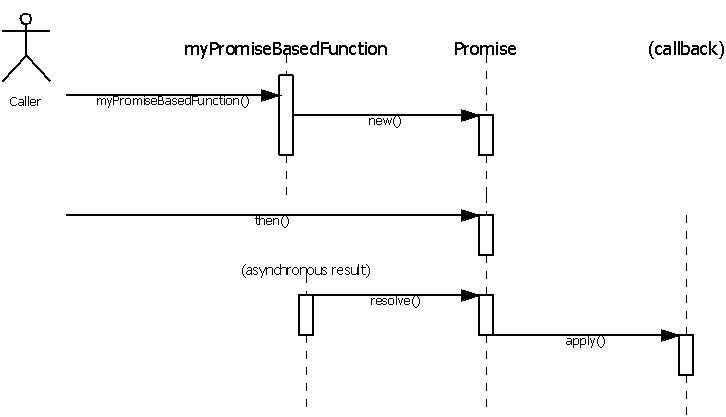
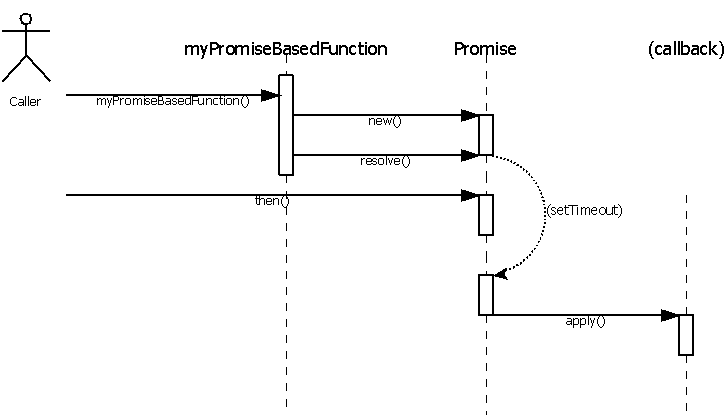
Hence, to work appropriately, a promise must defer its completion execution to let the caller build first the chain of callbacks.

Promise asynchronous

Promise synchronous
Promise synchronous

The only reliable way to implement such a code sequence is to use the setTimeout function in order to have the resolve method implementation be called after the registration of the callback function (i.e. calls of method then).

Responsive user interface

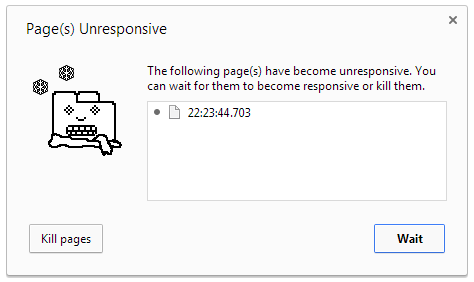
As any user interface, the design is polished to provide the best user experience possible. It means that long JavaScript operations are split into chunks and sequenced using setTimeout to prevent any interface freeze and get rid of the annoying long-script running message.

Long running example in Chrome

This long running sampler will allow you to see this dialog. Enter a number of seconds to wait for (usually 100s) and click go!

setTimeout in an inactive tab

Chrome and FireFox share a particularity that I discovered when using several tabs (later, I found that Opera was doing the same but Internet Explorer and Safari are safe). At some point, the application appeared to be 'frozen' when the tab was not active.

For instance, have a look to the following example page. It was designed to print the current time every 100 milliseconds both in the page title and in the page content. If the tab is not active, you will notice that it seems to refresh slower (nearly every second). I also added a real-time monitor that displays red dots if the interval between two calls is greater than 120 ms.

You can find good explanations of the reasons why as well as some possible workarounds by crawling the web:

As it seems that the setTimeout function works fine in a Web Worker thread, I decided to explore this possibility.

Timeout project

I created a new GitHub repository and started to work on a small library that would solve the issue.

Skeleton

This script is based on an immediately-invoked function expression. It has two advantages:

  • A private scope for variables and functions
  • When invoked, this is translated into the parameter self to provide the global context object

Hooking the APIs

First of all, the JavaScript language is really flexible as it relies on late binding. It means that every time you call a function using a name, the name is first resolved (as any variable) to get the function object.

for instance: /* In the following example, the JavaScript engine must: - first resolve the variable "gpf" - the member "bin" on the previous result - the member "toHexa" on the previous result This last result is considered as a function and called with the parameter 255 */ var result = gpf.bin.toHexa(255); // result is FF

In a browser, the main context object (the one that contains everything) is the window object. Keep that information in mind, this will be important for the next part.

Hence it is possible to redefine the setTimeout function by assigning a new function to the variable window.setTimeout. I decided to cover the whole timer API, that's why I redefined the followings:

Creating a Web Worker

To create an HTML5 Web Worker you need several things:

WARNING: the same-origin policy applies to this URL, you should read the documentation
  • A JavaScript code to create it: var worker = new Worker("source.js");
  • A way to communicate with the worker (will be covered in the next part)

Regarding the URL to load, one challenge that I started with is that I wanted the same script to be used not only to redefine the APIs in the main context but also to implement the Web Worker (so that only one file must be distributed). But it is impossible for a script to know how it has been loaded as you don't have its 'current' URL. So I created the method _getTimeoutURL to extract this URL:

  • It checks if a script tag with the id "timeout" exists
  • Or it checks all script tags for the one finishing with "timeout.js"
  • Or it returns "timeout.js"

Regarding the worker creation, the same script is used for the main context as well as the web worker. So I needed a way to distinguish the two situations. This is where the window object can help. Indeed, a worker thread can't access it: the worker object itself is the global context of the thread. That explains why the distinction is made by checking the window typeof.

Main thread / WebWorker communication

The communication between the main thread and the web worker is based on messages: they are asynchronous by nature.

Unless you start messing with the transferList parameter, you can only transmit types that are convertible to a JSON representation.

(This is a highly simplified truth. To be exact, HTML5 introduces the notion of structured clone algorithm used for serializing complex objects.)

To receive messages, you must register on the "message" event using addEventListener

Other implementation details

To make a long story short, every time you call setTimeout or setInterval, a new record is created in the corresponding dictionary (_timeouts or _intervals) to store the parameters of the call.

Its key is a number that is allocated (incremented) from _timeoutID or _intervalID.

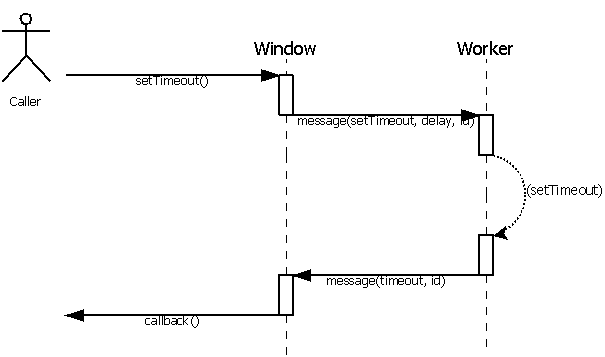
Then a message is sent to the worker thread to execute the timeout function: only the key and the delay are transmitted.

On timeout, the worker sends back a message with the key to the main thread which retrieves the parameters and executes the callback.

setTimeout sequence
setTimeout sequence

Possible improvements

Several aspects of this implementation can be improved:

  • Startup time: sometimes, the web worker requires several seconds to run. Because of that, all timeouts may be delayed more than necessary during this phase. An improvement would consist in switching to the new API only when the new thread is ready.
  • URL to load: digging on the net, I found a sample where the web worker was initialised using a data: URL. This clearly reduces the dependency with the source script but, then, we need a bootstrap to load the code inside the web worker.

Conclusion

It works and, more important, without modifying the original code! please check the following example page with fix (and don't forget to switch tab).

Wednesday, October 8, 2014

Reviewing a new book on Web #AppDevelopment published by #Packt: http://bit.ly/1qh6fsI

From the publisher review: http://bit.ly/1qh6fsI

About This Book

  • Design a simple application and turn it into the next Instagram
  • Integrate utilities such as Redis, Socket.io, and Backbone to create Node.js web applications
  • Learn to develop a complete web application right from the frontend to the backend in a streamlined manner

Who This Book Is For ?

If the phrase scalability sounds alien to you, then this is an ideal book for you. You will not need much Node.js experience as each framework is demonstrated in a way that requires no previous knowledge of the framework. You will be building scalable Node.js applications in no time! Knowledge of JavaScript is required.

Thursday, March 6, 2014

Goto fail;

Apple recently faced a security issue and provided a patch to fix it: About the security content of iOS 7.0.6
A web site is also available to check if your current OS must be updated: https://gotofail.com/

An interesting analysis of this - what appears to be - bug can be found in this article but please note that I am not sharing the point of view expressed in the conclusion.
I mean, whatever the way, bugs happen.
To make a long story short, it looks like a bad copy & paste duplicated a "goto fail;" instruction which, in the end, has no condition and is always evaluated.

As I recently talked about the advantages of using a lint-tool, I wanted to check if JShint would be capable of detecting this issue.
However - and fortunately - goto does not exist in JavaScript.

There are several ways to reproduce the same effect than a 'goto' instruction:

I usually embrace my if statements with brackets, I wanted to make my samples look similar to the initial problem and check how JSHint would react.
  • First example, the one-time do / while with break
  • function main(parameter) { var success = false; do { if (parameter === "condition1") break; if (parameter === "condition2") break; break; success = true; } while(0); if (success) { alert("Do"); } else { alert("Don't"); } } main("condition3"); JSHint produces a warning: 10 Unreachable 'success' after 'break'.
  • Second example, return in a separate function
  • function testCondition(parameter) { if (parameter === "condition1") return false; if (parameter === "condition2") return false; return false; return true; } function main(parameter) { if (testCondition(parameter)) { alert("Do"); } else { alert("Don't"); } } main("condition3"); JSHint produces a warning: 7 Unreachable 'return' after 'return'.
  • Last example, exceptions
  • function main(parameter) { try { if (parameter === "condition1") throw "fail"; if (parameter === "condition2") throw "fail"; throw "fail"; alert("Do"); } catch (e) { alert("Don't"); } } main("condition3"); JSHint produces a warning: 8 Unreachable 'alert' after 'throw'.

To conclude, JShint is capable of detecting an unreachable code and generates the appropriate warning.
It also means that all the warnings are meaningful and should be carefully considered.

If you want to check by yourself, go to http://www.jshint.com/ and copy & paste the samples directly where the JavaScript sample is written (upper left part of the homepage).

Wednesday, February 26, 2014

Mysteries of javascript objects, classes and inheritance (Part I)

What did I spend my time on during the last months?

I know that the blog activity does not reflect this reality but I have been working on my library during my - rare - spare time. For instance, I tried to organize the different features into namespaces to avoid creating one object containing all the methods.
Since I started the new job, I also rewrote some of it to fit most of JSLint validation rules and changed the way tests are made to support several hosts (cscript, nodeJS and a browser).

One interesting problem I had to deal with is related to the way attributes are handled in my implementation. Attributes could be compared to the Java annotations: they are information added to the source code that are retrieved at run-time using specific methods. They are used to generate code (such as object members' accessors) or customize behaviors (such as XML serialization).

I will write an article later about that very specific topic.

The problem I had to deal with is related to classes and inheritance: indeed, it sounds natural to inherit the attributes and - as a consequence - I needed the possibility to walk through the class hierarchy.
Also, I wanted to simplify the way attributes are created so I wrote aliases for constructors (let say object factories).

I learned a lot by implementing these methods and I would like to share with you my understanding of how objects are handled in JavaScript.

Classes and inheritance

First of all, I will not detail the class and inheritance concepts as they belong to the Object Oriented Programming languages. So I will take the assumption that you are familiar with these. If not, the previous link is a good starting point.

But, also, the main reason is that JavaScript is *not* an usual OOP language: it misses lots of interesting features such as the possibility to control members visibility (using private, protected and public), polymorphism or operators....

As a matter of fact, the class keyword is reserved but you can't do anything with it. You will also discover that the delete keyword exists but for a different usage.

That's why I would like to explain what is a JavaScript object, how it is declared and the way it can be manipulated in order to highlight what can be done and illustrate what can't.

Objects and members

My first object

In the JavaScript language, the simplest (and shortest) way to create an object is to write the following line of code:

var myObject1 = {};

The following syntax is strictly equivalent:

var myObject2 = new Object();

Those who are used to program with real OOP languages will recognize the use of the new operator.
I will come back later to this one, we will first focus on the result.

Both samples are generating an empty object and once created, it already exposes a number of predefined members (mostly methods), for instance:

  • toString a method that returns a string representation of the object
  • hasOwnProperty a method that will become helpful later in this article
  • constructor an object that will also be explained later

Members

To access the members (or call the methods), you can use either the "." operator or the "[]" one:

var string1 = myObject1.toString(); var string2 = myObject2["toString"]();
Calling a method is actually done in two steps: in JavaScript, functions are objects. When you access the member named "toString" on myObject1, it returns the function object. Then, the parenthesis are used to call the function and provide parameters.

Usually, the bracket operator is used whenever the member name is contained in a variable or if the name is an invalid identifier (just try to access the member named "my field" with the dot operator).

The real power of JavaScript compared to classical OOP languages is the fact that you can dynamically add any member to any object.
Again, there are several syntaxes you can use:

myObject1.additionalMember = "value"; myObject2["member"] = "value"; myObject1["member"] === myObject2.member;

Indeed, assigning a member on an object will either update the member (if already existing) or create it.

This simplicity is probably one of the most exciting feature of the JavaScript language. As a consequence, any object can be used as a map and there is virtually no limit to the number of members you can add to an object.
Very often, I used them as dictionary (to associate keys to values).

If you want to initialize the object with members, you can add them one by one:

var johnSmith = new Object(); johnSmith.firstName = "John"; johnSmith.lastName = "Smith"; johnSmith.age = 25; johnSmith.address = new Object(); johnSmith.address.streetAddress = "21 2nd Street"; johnSmith.address.city = "New York"; johnSmith.address.state = "NY"; johnSmith.address.postalCode = 10021;

Or you can make it simpler by using the JSON notation:

var johnSmith = { "firstName": "John", "lastName": "Smith", "age": 25, "address": { "streetAddress": "21 2nd Street", "city": "New York", "state": "NY", "postalCode": 10021 } };

This means that, unlike a strict OOP language, you can't be sure that your object will respect a given structure (or interface). To be more precise prototyping (that I will explain below) can help you ensure that the object has a minimum set of properties.

Object inspection

In any case, the JavaScript language also offers operators to inspect an object definition. Considering the fact that JavaScript allows you to check any function arity, it provides you a working concept of reflection.

Before going any further, accessing a member that is not defined does not generate any error. Instead, JavaScript returns a special value that represents this missing definition.

I hear some screams regarding the above assertion as most of us faced errors related to values that were not defined. However, please take a closer look at what really happened and you will realize that the error came from the use of the undefined value rather than its access.

The keyword undefined allows you to test this situation:

if (undefined === myObject1.notYetDefined) { myObject1.notYetDefined = "OK"; }

You may also want to use the typeof operator:
if ("undefined" === typeof myObject1.notYetDefined) { myObject1.notYetDefined = "OK"; }

I usually compare a value with undefined rather than using typeof. However, they are some situations where you have no choice. For instance, if you want to test if a global variable (so we are not really accessing a member), you have to use typeof.

So, those two operators allows you to verify if a member exists for a given object.

On the other hand, you might want to list all the members that are currently existing on the object.
This is where you will start using the operator in (this is also where the "[]" operator becomes really useful):

for (var member in myObject1) { alert(myObject1[member]); // Display the content of the member }

Another use of the in operator is to test if a member exists in an object:

if (!("notYetDefined" in myObject1)) { myObject1.notYetDefined = "OK"; }
There are lots of debate on the internet to know which method is the best to enumerate object members. For instance, JSLint does not allow the use of for in without using the hasOwnProperty.
My opinion is that it depends on what you really want to test and - right now - I just want to verify if myObject1 has a member named "notYetDefined" which is exactly what in is doing.
I hope things will become more clear in the next chapter.

Delete

To conclude with object inspection, there is one last operator that is not widely known and rarely used but it can be helpful when applied wisely (I will provide an example later): delete. As documented, it is used to remove a property from an object. It means that, unlike OOP languages, it does not 'free' objects.
An example of use:

if (!("notYetDefined" in myObject1)) { myObject1.notYetDefined = "OK"; } // Do something that relies on myObject1.notYetDefined console.log(myObject1.notYetDefined); // This will remove "notYetDefined" delete myObject1.notYetDefined; // Now "notYetDefined" is no more a property of in myObject1 console.log(typeof myObject1.notYetDefined); OK undefined

However, delete might seem to be dysfunctional in some cases.

Objects' own members vs prototype

The above sentence being confusing, here is an example to illustrate it:

var test = new Object(); if ("toString" in test) { console.log("test has \"toString\""); } else { console.log("test doesn't have \"toString\""); } delete test.toString; if ("toString" in test) { console.log("test still has \"toString\""); } else { console.log("test doesn't have \"toString\""); }

As a result, you will get:

test has "toString" test still has "toString"

According to everything that has been said before, we have two possibilities here:

  • Either the delete operator does not work as described
  • Or the toString member is not a property of the object

First, I confirm that delete operator works as described, however the sentence "remove a property from an object" has to be clarified.

hasOwnProperty

The operator hasOwnProperty has been introduced in the 3rd edition of the ECMAScript specification and is summarized as:
"returns a boolean indicating whether the object has the specified property"

But if you get a closer look to the documentation, the description provides the key to understand the reason why this operator was created: This method can be used to determine whether an object has the specified property as a direct property of that object; unlike the in operator, this method does not check down the object's prototype chain.

Applied to the previous example, here is what we obtain:

var test = new Object(); if ("toString" in test) { console.log("test has \"toString\""); } else { console.log("test doesn't have \"toString\""); } if (test.hasOwnProperty("toString") { console.log("\"toString\" is a direct property of test"); } else { console.log("\"toString\" is *not* a direct property of test"); } test has "toString" "toString" is *not* a direct property of test

So it means that the delete operator removes a direct property of an object.

Now... if "toString" is not a direct property of my object, where does it come from ?

Prototype

As a matter of fact, "toString" is defined on the Object prototype. This object defines all the properties and methods that are inherited by any instance of a JavaScript object.

This is the key concept in the language that allows modern JavaScript developers to achieve object oriented programming.

...to be continued...